<feed xmlns="http://www.w3.org/2005/Atom">
<link href="https://blog.18f.org/feed.xml" class="usa-link usa-link--external" rel="self" type="application/atom+xml"/>
<link href="https://blog.18f.org/" class="usa-link usa-link--external" rel="alternate" type="text/html"/>
<updated>2024-12-10T00:00:00.000Z</updated>
<id>https://blog.18f.org/feed.xml</id>
<title type="html">18F: Digital service delivery</title>
<subtitle>For over 11 years, non-partisan civil servants at 18F proudly served the American people to make government technology work better.</subtitle>
  <entry>
    <title type="html"><![CDATA[ How we measure the success of coaching engagements ]]></title>
    <link href="https://blog.18f.org/2024/12/10/how-we-measure-coaching/" class="usa-link usa-link--external" rel="alternate" type="text/html" title="How we measure the success of coaching engagements"/>
    <published>2024-12-10T00:00:00.000Z</published>
    <updated>2024-12-10T00:00:00.000Z</updated>
    <id>https://blog.18f.org/2024/12/10/how-we-measure-coaching/</id>
    <content type="html" xml:base="https://blog.18f.org/2024/12/10/how-we-measure-coaching/">
      <![CDATA[<style>  table { font-size: 1rem; }</style><p>18F's projects result in tangible outcomes, like redesigned websites and more efficient government services, as well as outcomes that are less easy to measure — like training or coaching agency staff in running essential technology product work.</p><p>To measure the output of these less tangible outcomes, we use tried and true techniques — drawing from tech, management, and other industries — to make our work visible and demonstrate how we're serving the American people.</p><h2 id="training-product-owner-skills" tabindex="-1">Training product owner skills<a href="#training-product-owner-skills" class="usa-link usa-link--external" class="heading-permalink" aria-label="Permalink for this section"><svg class="usa-icon" aria-hidden="true" focusable="false" role="img"><use xlink:href="#svg-link" class="usa-link usa-link--external" class="usa-link usa-link--external" class="usa-link usa-link--external" class="usa-link usa-link--external"></use></svg></a></h2><p>During one recent 18F project, our goal was to <a href="https://18f.org/guides/product/partners/" class="usa-link usa-link--external" class="usa-link usa-link--external" rel="noreferrer">enable agency partner staff members in being first-time product owners</a>. None of the agency staff had ever done product work, but they were tasked with managing a complex digital services project. It was important to the agency that we teach them well.</p><p>How would we know we were successful in turning agency staff into successful product owners?</p><h3 id="adding-a-measurable-framework" tabindex="-1">Adding a measurable framework<a href="#adding-a-measurable-framework" class="usa-link usa-link--external" class="heading-permalink" aria-label="Permalink for this section"><svg class="usa-icon" aria-hidden="true" focusable="false" role="img"><use xlink:href="#svg-link"></use></svg></a></h3><p>There's an adage that &quot;You can't change what you can't measure.&quot; We needed a way to measure the impact we were having, so we could know how well our coaching was working.</p><p>We decided to measure all the product owner trainees' progression in a set of important product owner skills. We brainstormed all of the product owner skills we could think of, then de-duplicated the list. Next, we voted on the skills using n/3 voting — that is, each person got one-third as many votes as there were stickies. For example, if there were 30 stickies, each person would get 10 votes.</p><p>In the end, we decided to measure product owners' progression in a set of 10 key skills, including <strong><a href="https://18f.org/guides/product/discover/" class="usa-link usa-link--external" class="usa-link usa-link--external" rel="noreferrer">Product discovery</a></strong>, <strong><a href="https://18f.org/guides/product/define/roadmap/" class="usa-link usa-link--external" class="usa-link usa-link--external" rel="noreferrer">Setting goals and a roadmap</a></strong>, and <strong><a href="https://18f.org/guides/derisking-government-tech/vendor-management/" class="usa-link usa-link--external" class="usa-link usa-link--external" rel="noreferrer">Managing vendors</a></strong>.</p><p>The next problem to solve was, how would we measure the development of these skills?</p><p>We decided to use a skill development approach called <strong>EDGE</strong>, which stands for <strong>Explain, Demonstrate, Guide, Enable</strong>. This is a decades-old, tried-and-true methodology how to teach a skill.</p><p>First the teacher <strong>Explain</strong>s what they're going to teach, then they <strong>Demonstrate</strong> it by showing the skill. Next, the learner starts trying it on their own, but the teacher is there to <strong>Guide</strong> the learner, correcting or refining the skill as they practice it. Then, the teacher <strong>Enables</strong> the learner to take ownership of the skill — the learner starts doing it on their own, intervening only when the learner requests help.</p><p>We decided to assess product owner skills by asking each apprentice product owner to do a self-assessment of their skills every few months, using a survey based on EDGE.</p><p>We created a table with the EDGE stages across the columns and the product skills down the rows. At regular intervals throughout the project, we asked the apprentice product owners to assess themselves on each of the 10 product ownership skills. Were they unfamiliar with the skill and needed explanations or demonstrations? Were they doing the skill, but still in need of guidance? Or did they think they were enabled to fully own the skill?</p><table><thead><tr><th style="text-align:center"></th><th style="text-align:center">Need explanation</th><th style="text-align:center">Need demonstration</th><th style="text-align:center">Need guidance</th><th style="text-align:center">Fully enabled</th></tr></thead><tbody><tr><td style="text-align:center">Product discovery</td><td style="text-align:center"></td><td style="text-align:center">X</td><td style="text-align:center"></td><td style="text-align:center"></td></tr><tr><td style="text-align:center">Set goals and roadmap</td><td style="text-align:center">X</td><td style="text-align:center"></td><td style="text-align:center"></td><td style="text-align:center"></td></tr><tr><td style="text-align:center">Manage vendors</td><td style="text-align:center"></td><td style="text-align:center"></td><td style="text-align:center">X</td><td style="text-align:center"></td></tr></tbody></table><caption><strong>Early skill development self-assessment.</strong> Shows the self-assessment of an apprentice product owner who needs a demonstration of product discovery, an explanation of how to set goals and roadmap, and guidance in managing vendors.</caption><p>Our goal was to get all the product owners to &quot;Enabled&quot; in all 10 skills. When we ran self-evaluations, we would look at what skills were more to the left of where we expected, and focus more on supporting the product owners in learning those skills.</p><p>We produced a new chart for each self-evaluation, so we could look back and see changes over time. As the product owners developed in skills, we could see movement to the right, toward the &quot;Enabled&quot; column.</p><table><thead><tr><th style="text-align:center"></th><th style="text-align:center">Need explanation</th><th style="text-align:center">Need demonstration</th><th style="text-align:center">Need guidance</th><th style="text-align:center">Fully enabled</th></tr></thead><tbody><tr><td style="text-align:center">Product discovery</td><td style="text-align:center"></td><td style="text-align:center"></td><td style="text-align:center"></td><td style="text-align:center">X</td></tr><tr><td style="text-align:center">Set goals and roadmap</td><td style="text-align:center"></td><td style="text-align:center"></td><td style="text-align:center">X</td><td style="text-align:center"></td></tr><tr><td style="text-align:center">Manage vendors</td><td style="text-align:center"></td><td style="text-align:center"></td><td style="text-align:center"></td><td style="text-align:center">X</td></tr></tbody></table><caption><strong>Later skill development self-assessment.</strong> Shows the self-assessment of an apprentice product owner who is further along in skill development than the last table, needing guidance in goal-setting but enabled in all other skills.</caption><p>By using this method, we were able to see that we effectively coached these product owner skills, and left the agency in good shape to manage their technology modernization project.</p><h3 id="using-multiple-types-of-assessments" tabindex="-1">Using multiple types of assessments<a href="#using-multiple-types-of-assessments" class="usa-link usa-link--external" class="heading-permalink" aria-label="Permalink for this section"><svg class="usa-icon" aria-hidden="true" focusable="false" role="img"><use xlink:href="#svg-link"></use></svg></a></h3><p>In this project, we only used the trainees' self-assessments. Next time, in addition to self-assessments, we'll ask the 18F leads to also assess the apprentices' skills, using the same EDGE chart. Then, we'll compare the self-assessment to the coach assessment and talk about the similarities we see, and the differences we see.</p><p>With both assessments, we can have two data points instead of one, which we expect will give a clearer picture of the skill development.</p><h3 id="in-conclusion" tabindex="-1">In conclusion<a href="#in-conclusion" class="usa-link usa-link--external" class="heading-permalink" aria-label="Permalink for this section"><svg class="usa-icon" aria-hidden="true" focusable="false" role="img"><use xlink:href="#svg-link"></use></svg></a></h3><p>You can't improve what you can't measure. When a digital services project includes less tangible outcomes such as skill development and coaching, make them visible by finding metrics to measure, and measuring them over time.</p><p>By measuring product owner skills over time, we were able to see that we were effectively training our agency partner's staff, and that we were delivering value by supporting our partner agency in sustainably managing their technology modernization effort.</p>]]>
    </content>
    <author>
      <name>a7585df00</name>
    </author>
    <category term="Best practices"/>
    <category term="How we work"/>
    <category term="Product"/>
    <summary type="html">
      <![CDATA[We use tried and true techniques to demonstrate how we're serving the American public.]]>
    </summary>
  </entry>
  <entry>
    <title type="html"><![CDATA[ 18F project defaults ]]></title>
    <link href="https://blog.18f.org/2024/12/05/2024-12-5-18f-project-defaults/" class="usa-link usa-link--external" rel="alternate" type="text/html" title="18F project defaults"/>
    <published>2024-12-05T00:00:00.000Z</published>
    <updated>2024-12-05T00:00:00.000Z</updated>
    <id>https://blog.18f.org/2024/12/05/2024-12-5-18f-project-defaults/</id>
    <content type="html" xml:base="https://blog.18f.org/2024/12/05/2024-12-5-18f-project-defaults/">
      <![CDATA[<p>This year, 18F worked on 31 projects across government agencies. Our digital services projects ranged from <a href="/2024/10/08/18f-year-of-launches/#:~:text=%F0%9F%9A%80%20IRS%20Direct%20File%20Pilot%20launch%20with%20the%20Internal%20Revenue%20Service%20and%20the%20U.S.%20Digital%20Service" class="usa-link usa-link--external">supporting the launch of the IRS Direct File Pilot</a>, to <a href="/2024/10/08/18f-year-of-launches/#national-accuracy-clearinghouse-launch-with-u-s-department-of-agriculture:~:text=%F0%9F%9A%80%20National%20Accuracy%20Clearinghouse%20launch%20with%20U.S.%20Department%20of%20Agriculture" class="usa-link usa-link--external">building the National Accuracy Clearinghouse with the U.S. Department of Agriculture</a> and <a href="/2024/10/08/18f-year-of-launches/#notify-gov-launch-with-gsa-public-benefits-studio:~:text=%F0%9F%9A%80%20Notify.gov%20launch%20with%20GSA%20Public%20Benefits%20Studio">helping GSA’s Benefits studio launch Notify.gov</a>.</p><p>In this post, we want to share five templates we have adopted as defaults across our projects.</p><ul><li><a href="https://handbook.tts.gsa.gov/assets/downloads/TEMPLATE_Project_README.docx">Project README</a>: helps new teammates and leadership quickly gain context on a project</li><li><a href="https://handbook.tts.gsa.gov/assets/downloads/TEMPLATE_Internal_kickoff_agenda.docx">Internal kickoff agenda</a>: allows teams to connect and absorb background information at the start of a project</li><li><a href="https://handbook.tts.gsa.gov/assets/downloads/TEMPLATE_Team_charter.docx">Team charter</a>: helps teams document roles, practices, and norms</li><li><a href="https://handbook.tts.gsa.gov/assets/downloads/TEMPLATE_Weekly_ship_template.docx">Weekly ship</a>: ensures stakeholders know about a project’s status, blockers, and progress towards outcomes, so they aren’t taken by surprise</li><li><a href="https://handbook.tts.gsa.gov/assets/downloads/TEMPLATE_Risk_tracker.xlsx">Risk tracker</a>: helps teams track risks and discuss mitigation plans throughout the project</li></ul><p>18F receives inquiries from digital services teams from around the U.S. and across the world asking about how we work. If your team works on digital services projects, we hope these templates will be useful.</p><p>Want to work with us? Reach out at <a href="mailto:Inquiries18F@gsa.gov">Inquiries18F@gsa.gov</a>.</p>]]>
    </content>
    <author>
      <name>a41bd9d7c</name>
    </author>
    <category term="18F"/>
    <category term="Best practices"/>
    <category term="How we work"/>
    <summary type="html">
      <![CDATA[This year, 18F worked on 31 projects across government agencies. We want to share five templates we have adopted as defaults across our projects.]]>
    </summary>
  </entry>
  <entry>
    <title type="html"><![CDATA[ Three ways to write fearless spreadsheet formulas ]]></title>
    <link href="https://blog.18f.org/2024/11/05/three-ways-to-write-fearless-spreadsheet-formulas/" class="usa-link usa-link--external" rel="alternate" type="text/html" title="Three ways to write fearless spreadsheet formulas"/>
    <published>2024-11-05T00:00:00.000Z</published>
    <updated>2024-11-05T00:00:00.000Z</updated>
    <id>https://blog.18f.org/2024/11/05/three-ways-to-write-fearless-spreadsheet-formulas/</id>
    <content type="html" xml:base="https://blog.18f.org/2024/11/05/three-ways-to-write-fearless-spreadsheet-formulas/">
      <![CDATA[<style>  table { font-size: 1rem; }</style><p><em>Reference to any non-federal entity does not constitute or imply its endorsement, recommendation, or favoring by GSA.</em></p><p>Are you afraid of spreadsheet formulas? You're not alone. Many people consider spreadsheets to be anxiety-producing messes of formula code that spit out cryptic <code>#N/A</code>s at the most minor of changes.</p><p>The problem is, <strong>we suspect that most government code runs in spreadsheets</strong>. Various unverifiable estimates floating around the internet suggest that between one and three billion people use spreadsheets, and that at least 500 million people write spreadsheet formulas. This would mean that spreadsheets are the most commonly-used programming systems in the world. That would also mean spreadsheets are where most government code lives — spreadsheet formulas are code, after all.</p><p>If spreadsheet formulas are the most prolific government code, and if people fear their spreadsheet formulas — well, that combination can't be good for government, or for the public servants who develop, use, and maintain those spreadsheets.</p><p><strong>The good news is, it doesn't have to be this way.</strong> We can make spreadsheet code easier to read by making it clearer and simpler. And when code is easier to read, it's easier to understand. If you understand your code, you can change it without fear.</p><p>To create clear spreadsheets, we can use simple, well-tested programming practices to write spreadsheet formulas.</p><p>Below, we'll work through an example problem, first using conventional spreadsheet formula-writing practice commonly used over the past 40 years or so. Then, we'll solve it again using simple, tried-and-true programming techniques that are now possible in modern spreadsheet programs.</p><p>The result? Truly delightful spreadsheet formulas. Feeling suspicious? That's understandable.</p><p>Let's get started.</p><h3 id="our-scenario" tabindex="-1">Our scenario<a href="#our-scenario" class="usa-link usa-link--external" class="heading-permalink" aria-label="Permalink for this section"><svg class="usa-icon" aria-hidden="true" focusable="false" role="img"><use xlink:href="#svg-link" class="usa-link usa-link--external" class="usa-link usa-link--external" class="usa-link usa-link--external" class="usa-link usa-link--external" class="usa-link usa-link--external" class="usa-link usa-link--external" class="usa-link usa-link--external" class="usa-link usa-link--external" class="usa-link usa-link--external" class="usa-link usa-link--external" class="usa-link usa-link--external" class="usa-link usa-link--external" class="usa-link usa-link--external"></use></svg></a></h3><p>Let's imagine we work for the National Park Service, in the fictional Igorville National Park. At the end of each day, we get a report of how many people visited the park that day. Our supervisor has asked us to create a cell in our spreadsheet that shows the average number of daily visitors to Igorville Park since the start of the fiscal quarter.</p><p>The general solution is to:</p><p>Divide the total number of visitors this quarter by the number of days elapsed in the quarter.Round up that number to the nearest integer.Then, add text at the beginning so it looks something like this:</p><pre class="shiki github-light" style="background-color: #ffffff; color: #24292f"><div class="language-id">sql</div><div class='code-container'><code><div class='line'><span style="color: #24292F">visitors per </span><span style="color: #0550AE">day</span><span style="color: #24292F">: </span><span style="color: #0550AE">171</span></div></code></div></pre><h2 id="writing-conventional-formulas" tabindex="-1">Writing conventional formulas<a href="#writing-conventional-formulas" class="usa-link usa-link--external" class="heading-permalink" aria-label="Permalink for this section"><svg class="usa-icon" aria-hidden="true" focusable="false" role="img"><use xlink:href="#svg-link"></use></svg></a></h2><p>Let's assume that the total visitors this quarter are in cell <code>B2</code>. The number of days elapsed this quarter are in cell <code>C2</code>.</p><table><thead><tr><th style="text-align:center"></th><th>A</th><th>B</th><th>C</th></tr></thead><tbody><tr><td style="text-align:center">1</td><td><strong>Daily visitor rate for 2025 Q1</strong></td><td><strong>Total visitors in 2025 Q1</strong></td><td><strong>Days elapsed in 2025 Q1</strong></td></tr><tr><td style="text-align:center">2</td><td>TODO: Formula for daily visitor rate</td><td>513</td><td>3</td></tr><tr><td style="text-align:center">3</td><td></td><td></td><td></td></tr></tbody></table><p>To get the rounded visitor rate, we'll divide the total park visitors by the number of days in the quarter, then round.</p><pre class="shiki github-light" style="background-color: #ffffff; color: #24292f"><div class="language-id">sql</div><div class='code-container'><code><div class='line'><span style="color: #CF222E">=</span><span style="color: #0550AE">ROUND</span><span style="color: #24292F">(B2 </span><span style="color: #CF222E">/</span><span style="color: #24292F"> C2)</span></div></code></div></pre><p>Next, we'll add the presentation logic. We'll convert the number to text, even though that's not always necessary. Then we'll add lead-in text that says <code>visitors per day: </code>.</p><pre class="shiki github-light" style="background-color: #ffffff; color: #24292f"><div class="language-id">sql</div><div class='code-container'><code><div class='line'><span style="color: #CF222E">=CONCATENATE</span><span style="color: #24292F">(</span><span style="color: #0A3069">"visitors per day: "</span><span style="color: #24292F">, </span><span style="color: #CF222E">TEXT</span><span style="color: #24292F">(</span><span style="color: #0550AE">ROUND</span><span style="color: #24292F">(B2 </span><span style="color: #CF222E">/</span><span style="color: #24292F"> C2)))</span></div></code></div></pre><p>There's a hidden divide-by-zero (<code>#DIV/0!</code>) error waiting to happen here. Do you see it?</p><p>On the first day of each quarter, zero days have elapsed, so <code>C2</code> will be zero. This means we'll get a divide-by-zero error the first day of each quarter. (This is also probably the day our supervisors will look at last quarter's numbers, so we don't want to show them a spreadsheet with ugly errors.)</p><p>Instead, let's catch the error, and output a message that the data is still pending for this quarter. We could try wrapping the whole formula in an <code>IFERROR</code> to catch the error, and report that &quot;Data is pending.&quot;</p><pre class="shiki github-light" style="background-color: #ffffff; color: #24292f"><div class="language-id">diff</div><div class='code-container'><code><div class='line'><span style="color: #116329">+=IFERROR(</span></div><div class='line'><span style="color: #24292F">  CONCATENATE("visitors per day: ", TEXT(ROUND(B2 / C2))), "Data is pending"</span></div><div class='line'><span style="color: #116329">+)</span></div></code></div></pre><p>But when we step back and read this code, the headaches begin.</p><p>The <code>IFERROR</code> is far away from the divide operation, so readers might not understand that we're trying to catch a divide-by-zero error. In a week or two, we're likely to forget what this <code>IFERROR</code> is doing.</p><p>Plus, we want to prevent only the divide-by-zero error, but the way this is written will catch <em>all</em> errors. We won't know if there's another type of error happening here that we should be aware of.</p><p>Let's make the connection between the potential error and the error-handling code more clear. To do this, we could rearrange the error and the error-handling to be closer together, like this.</p><pre class="shiki github-light" style="background-color: #ffffff; color: #24292f"><div class="language-id">sql</div><div class='code-container'><code><div class='line'><span style="color: #CF222E">=CONCATENATE</span><span style="color: #24292F">(</span><span style="color: #0A3069">"visitors per day: "</span><span style="color: #24292F">, </span><span style="color: #CF222E">TEXT</span><span style="color: #24292F">(</span><span style="color: #0550AE">ROUND</span><span style="color: #24292F">(IFERROR(B2 </span><span style="color: #CF222E">/</span><span style="color: #24292F"> C2, </span><span style="color: #0A3069">"Data is pending"</span><span style="color: #24292F">))))</span></div></code></div></pre><p>This won't work either. On the first day of each quarter, the formula would evaluate to <code>ROUND(&quot;Data is pending&quot;)</code>. Since you can't round text, this would give us a <code>#VALUE!</code> error.</p><p>Instead of handing the error like this, we can prevent the error from happening. We know that the error occurs under one specific condition — the first day of the quarter, when zero days have elapsed. So, let's add a pre-condition that prevents the error. This is known as a &quot;guard clause.&quot;</p><p>(If you're copying and pasting this code, remember to delete the comment denoted by <code>/* */</code>. These are my way to annotate the code, but the spreadsheet formula language will raise an error.)</p><pre class="shiki github-light" style="background-color: #ffffff; color: #24292f"><div class="language-id">sql</div><div class='code-container'><code><div class='line'><span style="color: #CF222E">=IF</span><span style="color: #24292F">(C2 </span><span style="color: #CF222E">=</span><span style="color: #24292F"> </span><span style="color: #0550AE">0</span><span style="color: #24292F">, </span><span style="color: #6E7781">/* guard clause */</span></div><div class='line'><span style="color: #24292F">  </span><span style="color: #0A3069">"Data is pending."</span><span style="color: #24292F">,</span></div><div class='line'><span style="color: #24292F">  </span><span style="color: #CF222E">CONCATENATE</span><span style="color: #24292F">(</span><span style="color: #0A3069">"visitors per day: "</span><span style="color: #24292F">, </span><span style="color: #CF222E">TEXT</span><span style="color: #24292F">(</span><span style="color: #0550AE">ROUND</span><span style="color: #24292F">(B2 </span><span style="color: #CF222E">/</span><span style="color: #24292F"> C2)))</span></div><div class='line'><span style="color: #24292F">)</span></div></code></div></pre><p>(You can make your formula span multiple lines by using Option + Return on Mac, or Control + Enter on PC.)</p><p>With the guard clause in place, the divide-by-zero can never happen! And with that, our formula is all set.</p><p>This formula is pretty clear when read aloud. In plain language, it reads something like: &quot;if there are zero days in the quarter, data is pending, otherwise, show the rounded daily visitor rate.&quot;</p><p>We could stop writing our formula here, and it would be fine — so long as this formula stayed about this simple. If we needed to make bigger changes, with more potential for errors, this could get overly complex very quickly.</p><h3 id="four-steps-your-code-should-follow" tabindex="-1">Four steps your code should follow<a href="#four-steps-your-code-should-follow" class="usa-link usa-link--external" class="heading-permalink" aria-label="Permalink for this section"><svg class="usa-icon" aria-hidden="true" focusable="false" role="img"><use xlink:href="#svg-link"></use></svg></a></h3><p>Let's pause a moment and think about the &quot;story&quot; this code is telling.</p><p>In his talk <a href="https://www.youtube.com/watch?v=T8J0j2xJFgQ" class="usa-link usa-link--external" class="usa-link usa-link--external" rel="noreferrer">Confident Code</a>, developer Avdi Grimm explains that code has to do four things:</p><ul><li>Collect input</li><li>Perform work</li><li>Deliver results</li><li>Handle failure</li></ul><p>When we read code, we should ideally see these four steps in order, telling a clear story.</p><p>Try reading the code in the last example out loud. Here's how I'd read the story of this code:</p><table><thead><tr><th>Code in plain language</th><th>Confident Code step</th></tr></thead><tbody><tr><td>If C2, the number of days, is zero</td><td>1. Collect input</td></tr><tr><td>Report &quot;Data is pending&quot;</td><td>4. Handle failure</td></tr><tr><td>Otherwise show &quot;visitors per day: &quot; next to...</td><td>3. Return results</td></tr><tr><td>...the rounded daily visitor rate</td><td>2. Perform work</td></tr></tbody></table><p>The story of this code puts the more important parts last. This formula calculates and reports the error rate, but not until the very end of the code. The &quot;perform work&quot; step comes last, instead of in second place like in Avdi's list. This is like reading a news article where the crucial information is introduced in the last paragraph.</p><p>But writing formulas this way probably feels familiar. That makes sense, because it's the way formula programming language has encouraged us all to write for the last 40 years. And while the conventional way we've written this formula works for this simple example, it isn't sustainable for more complex problems.</p><h2 id="three-techniques-for-writing-better-formulas" tabindex="-1">Three techniques for writing better formulas<a href="#three-techniques-for-writing-better-formulas" class="usa-link usa-link--external" class="heading-permalink" aria-label="Permalink for this section"><svg class="usa-icon" aria-hidden="true" focusable="false" role="img"><use xlink:href="#svg-link"></use></svg></a></h2><p>Let's approach this same problem using tried-and-true software design principles using three techniques. First, we'll tell a clear story that's easy to read and write. Then, we'll add comments to clarify what we've written. Last, we'll organize our code so readers can more easily understand our formula.</p><p>To do this, we'll use the functions <code>LET</code> and <code>LAMBDA</code>. These might be unfamiliar, since spreadsheet programs introduced these only in the last few years.</p><h3 id="technique-1-use-let-to-tell-a-clear-story" tabindex="-1">Technique 1: Use LET to tell a clear story<a href="#technique-1-use-let-to-tell-a-clear-story" class="usa-link usa-link--external" class="heading-permalink" aria-label="Permalink for this section"><svg class="usa-icon" aria-hidden="true" focusable="false" role="img"><use xlink:href="#svg-link"></use></svg></a></h3><h4 id="introducing-let" tabindex="-1">Introducing LET<a href="#introducing-let" class="usa-link usa-link--external" class="heading-permalink" aria-label="Permalink for this section"><svg class="usa-icon" aria-hidden="true" focusable="false" role="img"><use xlink:href="#svg-link"></use></svg></a></h4><p>Let's say we have a formula we want to put into our spreadsheet:</p><pre class="shiki github-light" style="background-color: #ffffff; color: #24292f"><div class="language-id">sql</div><div class='code-container'><code><div class='line'><span style="color: #24292F">x </span><span style="color: #CF222E">+</span><span style="color: #24292F"> y</span></div></code></div></pre><p>In conventional spreadsheet practice, we would replace these variables <code>x</code> and <code>y</code> with either literal values, such as <code>1</code> and <code>2</code>, or cell references, such as <code>A2</code> and <code>C2</code>.</p><pre class="shiki github-light" style="background-color: #ffffff; color: #24292f"><div class="language-id">sql</div><div class='code-container'><code><div class='line'><span style="color: #CF222E">=</span><span style="color: #0550AE">1</span><span style="color: #24292F"> </span><span style="color: #CF222E">+</span><span style="color: #24292F"> </span><span style="color: #0550AE">2</span></div></code></div></pre><pre class="shiki github-light" style="background-color: #ffffff; color: #24292f"><div class="language-id">sql</div><div class='code-container'><code><div class='line'><span style="color: #CF222E">=</span><span style="color: #24292F">A2 </span><span style="color: #CF222E">+</span><span style="color: #24292F"> C2</span></div></code></div></pre><p>With <code>LET</code>, we can assign values to variables. In this example, we'll set <code>x</code> and <code>y</code> to <code>1</code> and <code>2</code> respectively, while leaving the formula as-is.</p><pre class="shiki github-light" style="background-color: #ffffff; color: #24292f"><div class="language-id">sql</div><div class='code-container'><code><div class='line'><span style="color: #CF222E">=</span><span style="color: #24292F">LET(</span></div><div class='line'><span style="color: #24292F">  x, </span><span style="color: #0550AE">1</span><span style="color: #24292F">,  </span><span style="color: #6E7781">/* set x to 1 */</span></div><div class='line'><span style="color: #24292F">  y, </span><span style="color: #0550AE">2</span><span style="color: #24292F">,  </span><span style="color: #6E7781">/* set y to 2 */</span></div><div class='line'><span style="color: #24292F">  x </span><span style="color: #CF222E">+</span><span style="color: #24292F"> y  </span><span style="color: #6E7781">/* evaluates to `1 + 2`, which returns `3` */</span></div><div class='line'><span style="color: #24292F">)</span></div></code></div></pre><p>The first line assigns the value <code>1</code> to the variable <code>x</code>, and sets <code>y</code> to <code>2</code>. The last line is the formula, where everything previously assigned is evaluated.</p><p><code>LET</code> can assign any other formula or expression to a variable, like this:</p><pre class="shiki github-light" style="background-color: #ffffff; color: #24292f"><div class="language-id">sql</div><div class='code-container'><code><div class='line'><span style="color: #CF222E">=</span><span style="color: #24292F">LET(</span></div><div class='line'><span style="color: #24292F">  x, </span><span style="color: #0550AE">1</span><span style="color: #24292F"> </span><span style="color: #CF222E">+</span><span style="color: #24292F"> </span><span style="color: #0550AE">2</span><span style="color: #24292F"> </span><span style="color: #CF222E">+</span><span style="color: #24292F"> </span><span style="color: #0550AE">3</span><span style="color: #24292F">, </span><span style="color: #6E7781">/* set x to 6 */</span></div><div class='line'><span style="color: #24292F">  y, x </span><span style="color: #CF222E">*</span><span style="color: #24292F"> </span><span style="color: #0550AE">2</span><span style="color: #24292F">,     </span><span style="color: #6E7781">/* set y to 12, using the already-set value for x */</span></div><div class='line'><span style="color: #24292F">  x </span><span style="color: #CF222E">+</span><span style="color: #24292F"> y         </span><span style="color: #6E7781">/* returns `18` */</span></div><div class='line'><span style="color: #24292F">)</span></div></code></div></pre><p>How does naming values like this help make our formulas better? Well, we can use this to tell the story of our formula in clear steps.</p><h4 id="writing-the-story-of-our-code" tabindex="-1">Writing the story of our code<a href="#writing-the-story-of-our-code" class="usa-link usa-link--external" class="heading-permalink" aria-label="Permalink for this section"><svg class="usa-icon" aria-hidden="true" focusable="false" role="img"><use xlink:href="#svg-link"></use></svg></a></h4><p>First, let's write the story of our code, following the order of Avdi's steps.</p><p>Gather input: Get the number of visitors in the quarter and the number of days in the quarterPerform work: Divide the number of visitors by the number of days to get the rate, then round the rateHandle failure: Handle when there are zero days elapsed at the start of a quarterDeliver results: Format and present the rate</p><p>Let's translate these steps, in this order, into formula code.</p><pre class="shiki github-light" style="background-color: #ffffff; color: #24292f"><div class="language-id">sql</div><div class='code-container'><code><div class='line'><span style="color: #CF222E">=</span><span style="color: #24292F">LET(</span></div><div class='line'><span style="color: #24292F">  </span><span style="color: #6E7781">/* 1. Gather input */</span></div><div class='line'><span style="color: #24292F">  visitors_in_quarter, B2,</span></div><div class='line'><span style="color: #24292F">  days_in_quarter, C2,</span></div><div class='line'></div><div class='line'><span style="color: #24292F">  </span><span style="color: #6E7781">/* 2. Perform work */</span></div><div class='line'><span style="color: #24292F">  daily_visitor_rate, </span><span style="color: #0550AE">ROUND</span><span style="color: #24292F">(visitors_in_quarter</span><span style="color: #CF222E">/</span><span style="color: #24292F">days_in_quarter),</span></div><div class='line'><span style="color: #24292F">  </span><span style="color: #CF222E">IF</span><span style="color: #24292F">(</span></div><div class='line'><span style="color: #24292F">     </span><span style="color: #6E7781">/* 3. Handle failure */</span></div><div class='line'><span style="color: #24292F">  days_in_quarter </span><span style="color: #CF222E">&lt;=</span><span style="color: #24292F"> </span><span style="color: #0550AE">0</span><span style="color: #24292F">,</span></div><div class='line'><span style="color: #24292F">  </span><span style="color: #0A3069">"Data is pending."</span><span style="color: #24292F">,</span></div><div class='line'></div><div class='line'><span style="color: #24292F">     </span><span style="color: #6E7781">/* 4. Deliver results */</span></div><div class='line'><span style="color: #24292F">     </span><span style="color: #0A3069">"visitors per day: "</span><span style="color: #24292F"> & daily_visitor_rate</span></div><div class='line'><span style="color: #24292F">  )</span></div><div class='line'><span style="color: #24292F">)</span></div></code></div></pre><p>This tells a much clearer story than the previous conventional formula. The inputs are named, so we know we're working with visitors and days in the quarter. The visitor rate is named, so when we present it with the &quot;visitors per day: &quot; text, it's clear what we're presenting. Even a first-time reader would have a pretty good idea of what's happening here.</p><p>In conclusion, <code>LET</code> helps you name the inputs and steps in your formula code, and these names clarify your story.</p><h3 id="technique-2-use-comments-to-clarify-readable-code" tabindex="-1">Technique 2: Use comments to clarify readable code<a href="#technique-2-use-comments-to-clarify-readable-code" class="usa-link usa-link--external" class="heading-permalink" aria-label="Permalink for this section"><svg class="usa-icon" aria-hidden="true" focusable="false" role="img"><use xlink:href="#svg-link"></use></svg></a></h3><h4 id="what-are-comments" tabindex="-1">What are comments?<a href="#what-are-comments" class="usa-link usa-link--external" class="heading-permalink" aria-label="Permalink for this section"><svg class="usa-icon" aria-hidden="true" focusable="false" role="img"><use xlink:href="#svg-link"></use></svg></a></h4><p>When software developers write code, they can leave comments in the code. Comments are narrative descriptions of the code, which other developers can read to better understand the code.</p><p>If comments are being used instead of writing clear code, the code and developers suffer. You may hear anti-comment sentiments from some developers, but my understanding is that disdain for comments is a reaction to the negative experience when comments are used as a substitute for clear code.</p><p>If comments are being used to supplement writing clear code, they can be quite helpful. Comments can provide context, explain assumptions, warn about common mistakes, and more. Comments can also summarize the formula, so that readers don't have to read all the code to understand what's going on.</p><p>But spreadsheet programs don't let you leave comments — <em>or do they</em>?</p><h4 id="writing-our-first-comment" tabindex="-1">Writing our first comment<a href="#writing-our-first-comment" class="usa-link usa-link--external" class="heading-permalink" aria-label="Permalink for this section"><svg class="usa-icon" aria-hidden="true" focusable="false" role="img"><use xlink:href="#svg-link"></use></svg></a></h4><p>In other languages, a special identifier like a hash (<code>#</code>), double-slash (<code>//</code>), or other syntax (<code>/* */</code>) will indicate a comment. Spreadsheet language doesn't let you do <em>quite</em> that, which you may already know if you tried to copy and paste some of the prior code examples into a spreadsheet.</p><p>But believe it or not, you can use <code>LET</code> to leave a comment!</p><pre class="shiki github-light" style="background-color: #ffffff; color: #24292f"><div class="language-id">sql</div><div class='code-container'><code><div class='line'><span style="color: #CF222E">=</span><span style="color: #24292F">LET(</span></div><div class='line'><span style="color: #24292F">  comment, </span><span style="color: #0A3069">"</span></div><div class='line'><span style="color: #0A3069">     Calculates the daily visitor rate for the current quarter.</span></div><div class='line'><span style="color: #0A3069">     On the first day of the quarter (0 days elapsed), it will say that data is pending.</span></div><div class='line'><span style="color: #0A3069">  "</span><span style="color: #24292F">,</span></div><div class='line'><span style="color: #24292F">  visitors_in_quarter, B2,</span></div><div class='line'><span style="color: #24292F">  days_in_quarter, C2,</span></div><div class='line'><span style="color: #24292F">  daily_visitor_rate, </span><span style="color: #0550AE">ROUND</span><span style="color: #24292F">(visitors_in_quarter</span><span style="color: #CF222E">/</span><span style="color: #24292F">days_in_quarter),</span></div><div class='line'><span style="color: #24292F">  </span><span style="color: #CF222E">IF</span><span style="color: #24292F">(</span></div><div class='line'><span style="color: #24292F">  days_in_quarter </span><span style="color: #CF222E">&lt;=</span><span style="color: #24292F"> </span><span style="color: #0550AE">0</span><span style="color: #24292F">,</span></div><div class='line'><span style="color: #24292F">  </span><span style="color: #0A3069">"Data is pending."</span><span style="color: #24292F">,</span></div><div class='line'><span style="color: #24292F">     </span><span style="color: #0A3069">"visitors per day: "</span><span style="color: #24292F"> & daily_visitor_rate</span></div><div class='line'><span style="color: #24292F">  )</span></div><div class='line'><span style="color: #24292F">)</span></div></code></div></pre><p>If your spreadsheets are large and complex, or built by a team of people, you can make a team decision to use a standard comment format. If you use a standard, your team won't have to waste time developing its own commenting conventions. As a Ruby developer, I've repurposed the Ruby comment standard <a href="https://www.rubydoc.info/gems/yard/file/docs/Tags.md#Tag_List" class="usa-link usa-link--external" class="usa-link usa-link--external" rel="noreferrer">YARD</a> for use in my more complex sheets.</p><p>In conclusion, commenting summarizes and clarifies your formulas, and helps your team members and yourself remember important things about your code.</p><h3 id="technique-3-use-lambda-to-organize-your-code" tabindex="-1">Technique 3: Use LAMBDA to organize your code<a href="#technique-3-use-lambda-to-organize-your-code" class="usa-link usa-link--external" class="heading-permalink" aria-label="Permalink for this section"><svg class="usa-icon" aria-hidden="true" focusable="false" role="img"><use xlink:href="#svg-link"></use></svg></a></h3><p>Let's return to our scenario, calculating the daily visitor rate. Here's where we left off using <code>LET</code>:</p><pre class="shiki github-light" style="background-color: #ffffff; color: #24292f"><div class="language-id">sql</div><div class='code-container'><code><div class='line'><span style="color: #CF222E">=</span><span style="color: #24292F">LET(</span></div><div class='line'><span style="color: #24292F">  visitors_in_quarter, B2,</span></div><div class='line'><span style="color: #24292F">  days_in_quarter, C2,</span></div><div class='line'><span style="color: #24292F">  daily_visitor_rate, </span><span style="color: #0550AE">ROUND</span><span style="color: #24292F">(visitors_in_quarter</span><span style="color: #CF222E">/</span><span style="color: #24292F">days_in_quarter),</span></div><div class='line'><span style="color: #24292F">  </span><span style="color: #CF222E">IF</span><span style="color: #24292F">(</span></div><div class='line'><span style="color: #24292F">  days_in_quarter </span><span style="color: #CF222E">&lt;=</span><span style="color: #24292F"> </span><span style="color: #0550AE">0</span><span style="color: #24292F">,</span></div><div class='line'><span style="color: #24292F">  </span><span style="color: #0A3069">"Data is pending."</span><span style="color: #24292F">,</span></div><div class='line'><span style="color: #24292F">     </span><span style="color: #0A3069">"visitors per day: "</span><span style="color: #24292F"> & daily_visitor_rate</span></div><div class='line'><span style="color: #24292F">  )</span></div><div class='line'><span style="color: #24292F">)</span></div></code></div></pre><p>Let's say our fictional supervisor has discovered that the system that sends our spreadsheet the visitor numbers has a bug. Every day, that system over-counts by 10 visitors per day. Here's a table with a few examples.</p><table><thead><tr><th>Day in quarter</th><th>Visitor count reported by buggy system</th><th>Visitor count, actual</th></tr></thead><tbody><tr><td>1</td><td>141</td><td>131</td></tr><tr><td>2</td><td>170</td><td>160</td></tr><tr><td>3</td><td>202</td><td>192</td></tr></tbody></table><p>Our supervisor has asked us to display the corrected number, but to also report the un-adjusted numbers so the executives understand what's going on, since they also look at the old system.</p><p>So, on day 3 in the above table, we'd expect to see:</p><pre class="shiki github-light" style="background-color: #ffffff; color: #24292f"><div class='code-container'><code><div class='line'><span style="color: undefined">visitors per day: 161 (adjusted from 171)</span></div></code></div></pre><p>What a nightmare! Or is it? Can we turn this nightmare into a delight?</p><p>When writing formulas, simpler is better. So if you have a complex problem to solve, it's helpful to break it into simpler problems. The practice of solving complex problems by breaking them into smaller and simpler problems is called &quot;decomposition.&quot; Each piece will be easier to think about and solve, and then you can compose all the pieces together into the solution.</p><p>Let's add the adjusted numbers and rates into our formula.</p><pre class="shiki github-light" style="background-color: #ffffff; color: #24292f"><div class="language-id">diff</div><div class='code-container'><code><div class='line'><span style="color: #24292F">=LET(</span></div><div class='line'><span style="color: #24292F">  visitors_in_quarter, B2,</span></div><div class='line'><span style="color: #24292F">  days_in_quarter, C2,</span></div><div class='line'><span style="color: #116329">+ adjusted_visitors_in_quarter, visitors_in_quarter - (10 * days_in_quarter),</span></div><div class='line'><span style="color: #24292F">  daily_visitor_rate, ROUND(visitors_in_quarter/days_in_quarter),</span></div><div class='line'><span style="color: #116329">+ adjusted_daily_visitor_rate, ROUND(adjusted_visitors_in_quarter/days_in_quarter),</span></div><div class='line'><span style="color: #24292F">  IF(</span></div><div class='line'><span style="color: #24292F">    days_in_quarter &lt;= 0,</span></div><div class='line'><span style="color: #24292F">    "Data is pending.",</span></div><div class='line'><span style="color: #24292F">    "visitors per day: " & adjusted_daily_visitor_rate & "(adjusted from " & daily_visitor_rate & ")"</span></div><div class='line'><span style="color: #24292F">  )</span></div><div class='line'><span style="color: #24292F">)</span></div></code></div></pre><p>Notice how we do the same rate calculation twice, but with different numbers — we're dividing, then rounding.</p><p>It's common practice in software development to try to reduce the amount of duplication. We call it DRY, which stands for Don't Repeat Yourself. We can reduce duplication with <code>LAMBDA</code>, a relatively new feature in spreadsheet programs.</p><p>In the next code example, we'll add a lambda, then reduce duplicated code by using the lambda instead.</p><pre class="shiki github-light" style="background-color: #ffffff; color: #24292f"><div class="language-id">diff</div><div class='code-container'><code><div class='line'><span style="color: #24292F">=LET(</span></div><div class='line'><span style="color: #24292F">  visitors_in_quarter, B2,</span></div><div class='line'><span style="color: #24292F">  days_in_quarter, C2,</span></div><div class='line'></div><div class='line'><span style="color: #116329">+ visitor_rate, LAMBDA(visitor_count, ROUND(visitor_count/days_in_quarter)),</span></div><div class='line'><span style="color: #24292F">  adjusted_visitors_in_quarter, visitors_in_quarter - (10 * days_in_quarter),</span></div><div class='line'></div><div class='line'><span style="color: #116329">+ daily_rate, visitor_rate(visitors_in_quarter),</span></div><div class='line'><span style="color: #116329">+ adjusted_daily_rate, visitor_rate(adjusted_visitors_in_quarter),</span></div><div class='line'></div><div class='line'><span style="color: #24292F">  IF(</span></div><div class='line'><span style="color: #24292F">    days_in_quarter &lt;= 0,</span></div><div class='line'><span style="color: #24292F">    "Data is pending.",</span></div><div class='line'><span style="color: #24292F">    "visitors per day: " & adjusted_daily_rate & "(adjusted from " & daily_rate & ")"</span></div><div class='line'><span style="color: #24292F">  )</span></div><div class='line'><span style="color: #24292F">)</span></div></code></div></pre><p>We've just created our first lambda! Lambdas are mini-formulas you can use and reuse within a main formula. We've created a lambda named <code>visitor_rate</code> that takes any visitor count and divides it by the number of days elapsed. We then use that lambda twice, giving it different numbers to use to calculate the rounded rate.</p><p>Let's make one more change, and move the details of how we format or present the rate into its own <code>LAMBDA</code>. Moving complexity out of the main body of the formula can help clarify the code. We can trust the body of the code to be the most important part, and then we can go back and read the lambdas if we need to get into the details of how they work.</p><pre class="shiki github-light" style="background-color: #ffffff; color: #24292f"><div class="language-id">diff</div><div class='code-container'><code><div class='line'><span style="color: #24292F">=LET(</span></div><div class='line'><span style="color: #24292F">  visitor_rate, LAMBDA(visitor_count, ROUND(visitor_count/days_in_quarter)),</span></div><div class='line'><span style="color: #116329">+ format, LAMBDA(adjusted, original, IF(</span></div><div class='line'><span style="color: #116329">+     days_in_quarter &lt;= 0,</span></div><div class='line'><span style="color: #116329">+     "Data is pending.",</span></div><div class='line'><span style="color: #116329">+     "visitors per day: " & adjusted & "(adjusted from " & original & ")"</span></div><div class='line'><span style="color: #116329">+   )</span></div><div class='line'><span style="color: #116329">+ ),</span></div><div class='line'></div><div class='line'><span style="color: #24292F">  visitors_in_quarter, B2,</span></div><div class='line'><span style="color: #24292F">  days_in_quarter, C2,</span></div><div class='line'><span style="color: #24292F">  adjusted_visitors_in_quarter, visitors_in_quarter - (10 * days_in_quarter),</span></div><div class='line'><span style="color: #24292F">  daily_rate, visitor_rate(visitors_in_quarter),</span></div><div class='line'><span style="color: #24292F">  adjusted_daily_rate, visitor_rate(adjusted_visitors_in_quarter),</span></div><div class='line'><span style="color: #116329">+ format(adjusted_daily_rate, daily_rate)</span></div><div class='line'><span style="color: #24292F">)</span></div></code></div></pre><p>Let's annotate this code again using Avdi's story steps. We'll omit some of the code (indicated by &quot;...&quot;) for brevity.</p><pre class="shiki github-light" style="background-color: #ffffff; color: #24292f"><div class="language-id">sql</div><div class='code-container'><code><div class='line'><span style="color: #CF222E">=</span><span style="color: #24292F">LET(</span></div><div class='line'><span style="color: #24292F">  visitor_rate, ...,</span></div><div class='line'><span style="color: #24292F">  </span><span style="color: #0550AE">format</span><span style="color: #24292F">, ...,</span></div><div class='line'></div><div class='line'><span style="color: #24292F">  </span><span style="color: #6E7781">/* 1. Gather input */</span></div><div class='line'><span style="color: #24292F">  visitors_in_quarter, B2,</span></div><div class='line'><span style="color: #24292F">  days_in_quarter, C2,</span></div><div class='line'></div><div class='line'><span style="color: #24292F">  </span><span style="color: #6E7781">/* 2. Perform work */</span></div><div class='line'><span style="color: #24292F">  adjusted_visitors_in_quarter, visitors_in_quarter </span><span style="color: #CF222E">-</span><span style="color: #24292F"> (</span><span style="color: #0550AE">10</span><span style="color: #24292F"> </span><span style="color: #CF222E">*</span><span style="color: #24292F"> days_in_quarter),</span></div><div class='line'><span style="color: #24292F">  daily_rate, visitor_rate(visitors_in_quarter),</span></div><div class='line'><span style="color: #24292F">  adjusted_daily_rate, visitor_rate(adjusted_visitors_in_quarter),</span></div><div class='line'></div><div class='line'><span style="color: #24292F">  </span><span style="color: #6E7781">/* 3. Handle failure - not relevant */</span></div><div class='line'></div><div class='line'><span style="color: #24292F">  </span><span style="color: #6E7781">/* 4. Deliver results */</span></div><div class='line'><span style="color: #24292F">  </span><span style="color: #0550AE">format</span><span style="color: #24292F">(adjusted_daily_rate, daily_rate)</span></div><div class='line'><span style="color: #24292F">)</span></div></code></div></pre><p>Reading this, we understand that there's a visitor rate step and a format step — but we don't necessarily need to know all the details of them for now.</p><p>In conclusion, <code>LAMBDA</code> helps you organize and reuse your code, especially in response to changing needs. This helps keep the readers' focus on what's important, and they can always dig into details as needed.</p><h3 id="bonus-technique-use-custom-functions-to-name-formulas" tabindex="-1">Bonus technique: Use custom functions to name formulas<a href="#bonus-technique-use-custom-functions-to-name-formulas" class="usa-link usa-link--external" class="heading-permalink" aria-label="Permalink for this section"><svg class="usa-icon" aria-hidden="true" focusable="false" role="img"><use xlink:href="#svg-link"></use></svg></a></h3><p>Even with our readable code, one problem remains. Every time someone looks at this formula, they have to read 16 lines of code to understand it.</p><p>In this case, the easiest-to-read solution would be to name the formula. How about something like, &quot;daily visitor rate&quot;?</p><p>With the custom formula creator available in major spreadsheet programs, we can do exactly that.</p><p><strong>In Google Sheets:</strong></p><ul><li>Right-click on the cell containing the formula</li><li>Click &quot;View more cell actions&quot;, then &quot;Define named function&quot;</li><li>Give the function a name like <code>DAILY_VISITOR_RATE</code>.</li><li>In &quot;Argument placeholders,&quot; add <code>visitors_in_quarter</code> and <code>days_elapsed_in_quarter</code>.</li><li>In the formula definition, delete the two lines that set those variables. Those variables will now be added directly to the formula, so we don't need the cell references.</li></ul><pre class="shiki github-light" style="background-color: #ffffff; color: #24292f"><div class="language-id">sql</div><div class='code-container'><code><div class='line'><span style="color: #24292F">  visitors_in_quarter, B2,</span></div><div class='line'><span style="color: #24292F">  days_elapsed_in_quarter, C2,</span></div></code></div></pre><p>Then, save the function.</p><p>Now you can replace the formula with the named function:</p><pre class="shiki github-light" style="background-color: #ffffff; color: #24292f"><div class="language-id">sql</div><div class='code-container'><code><div class='line'><span style="color: #CF222E">=</span><span style="color: #24292F">DAILY_VISITOR_RATE(B2, C2)</span></div></code></div></pre><p>Before, anyone would have to read all the code or comments to understand what was happening. Now, it's probably clear from just the name. And if they need to understand the inner workings of this formula, they can look it up in the list of custom formulas.</p><h3 id="summary" tabindex="-1">Summary<a href="#summary" class="usa-link usa-link--external" class="heading-permalink" aria-label="Permalink for this section"><svg class="usa-icon" aria-hidden="true" focusable="false" role="img"><use xlink:href="#svg-link"></use></svg></a></h3><p>We started with this:</p><pre class="shiki github-light" style="background-color: #ffffff; color: #24292f"><div class="language-id">sql</div><div class='code-container'><code><div class='line'><span style="color: #CF222E">=IF</span><span style="color: #24292F">(C2 </span><span style="color: #CF222E">=</span><span style="color: #24292F"> </span><span style="color: #0550AE">0</span><span style="color: #24292F">,</span></div><div class='line'><span style="color: #24292F">  </span><span style="color: #0A3069">"Data is pending."</span><span style="color: #24292F">,</span></div><div class='line'><span style="color: #24292F">  </span><span style="color: #CF222E">CONCATENATE</span><span style="color: #24292F">(</span><span style="color: #0A3069">"visitors per day: "</span><span style="color: #24292F">, </span><span style="color: #CF222E">TEXT</span><span style="color: #24292F">(</span><span style="color: #0550AE">ROUND</span><span style="color: #24292F">(B2 </span><span style="color: #CF222E">/</span><span style="color: #24292F"> C2)))</span></div><div class='line'><span style="color: #24292F">)</span></div></code></div></pre><p>We're ending with this:</p><pre class="shiki github-light" style="background-color: #ffffff; color: #24292f"><div class="language-id">sql</div><div class='code-container'><code><div class='line'><span style="color: #CF222E">=</span><span style="color: #24292F">DAILY_VISITOR_RATE(B2, C2)</span></div></code></div></pre><p>And behind that named function is a formula with clear variable names using <code>LET</code>, separated components using <code>LAMBDA</code>, and comments to clarify the code. This approach is a relatively new option available to us.</p><p>Using software design principles and practices, our formula is much easier to read, understand, and change. Future readers will thank us — including ourselves, because we're future readers too!</p><p>Code that is easier to read is easier to understand. And code that is easier to understand is easier to change without fear and maintain over time. Go forth and write fearless formulas!</p>]]>
    </content>
    <author>
      <name>a7585df00</name>
    </author>
    <category term="Best practices"/>
    <category term="Guides and tutorials"/>
    <summary type="html">
      <![CDATA[Spreadsheets are the world's most popular programming environment — and the most feared. But what if spreadsheet formulas were easy to read and change without fear? Learn how a few simple principles can make your spreadsheets a joy to work with.]]>
    </summary>
  </entry>
  <entry>
    <title type="html"><![CDATA[ 18F Folks: Adopting a new illustration library ]]></title>
    <link href="https://blog.18f.org/2024/10/21/18f-folks/" class="usa-link usa-link--external" rel="alternate" type="text/html" title="18F Folks: Adopting a new illustration library"/>
    <published>2024-10-21T00:00:00.000Z</published>
    <updated>2024-10-21T00:00:00.000Z</updated>
    <id>https://blog.18f.org/2024/10/21/18f-folks/</id>
    <content type="html" xml:base="https://blog.18f.org/2024/10/21/18f-folks/">
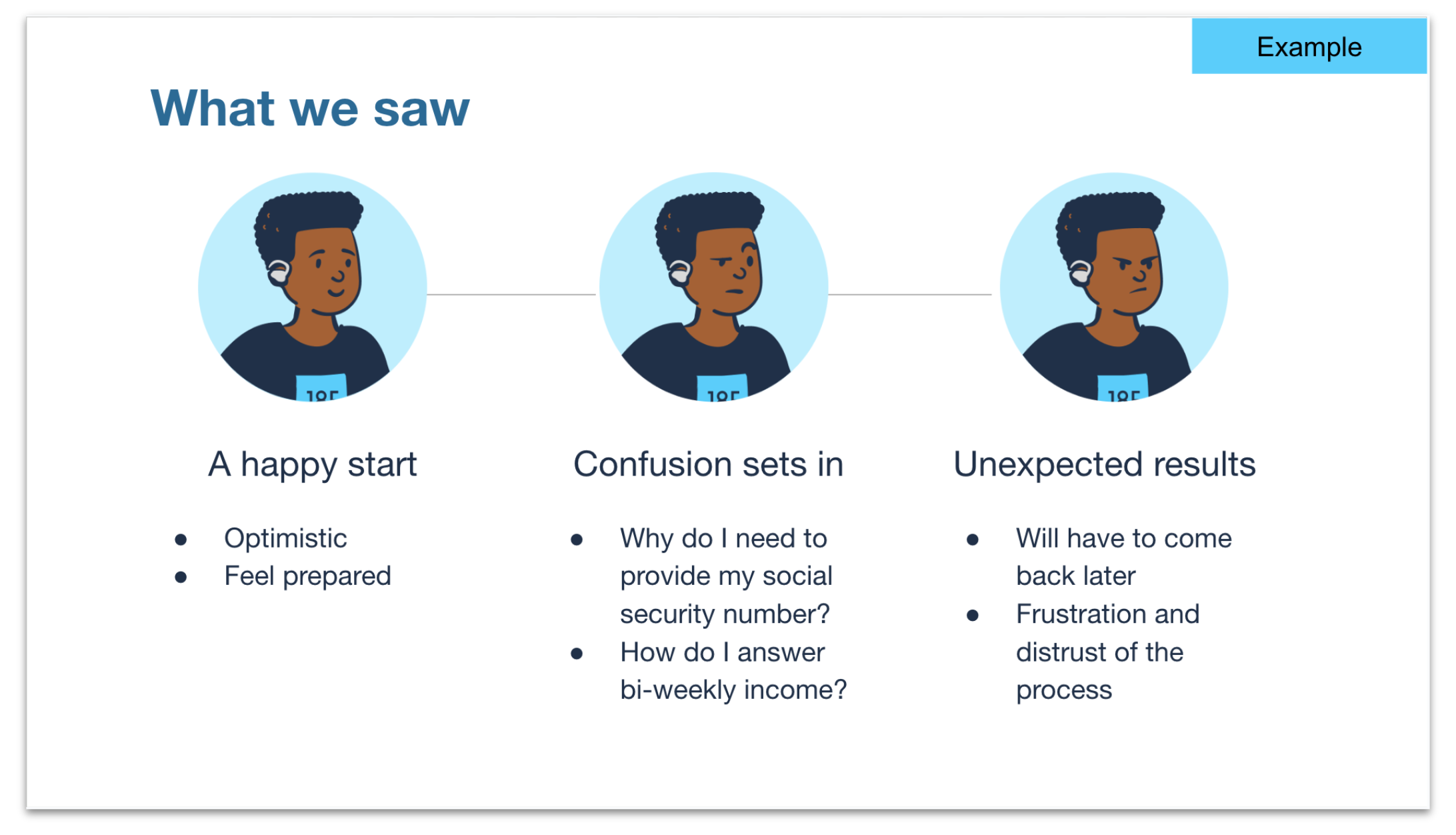
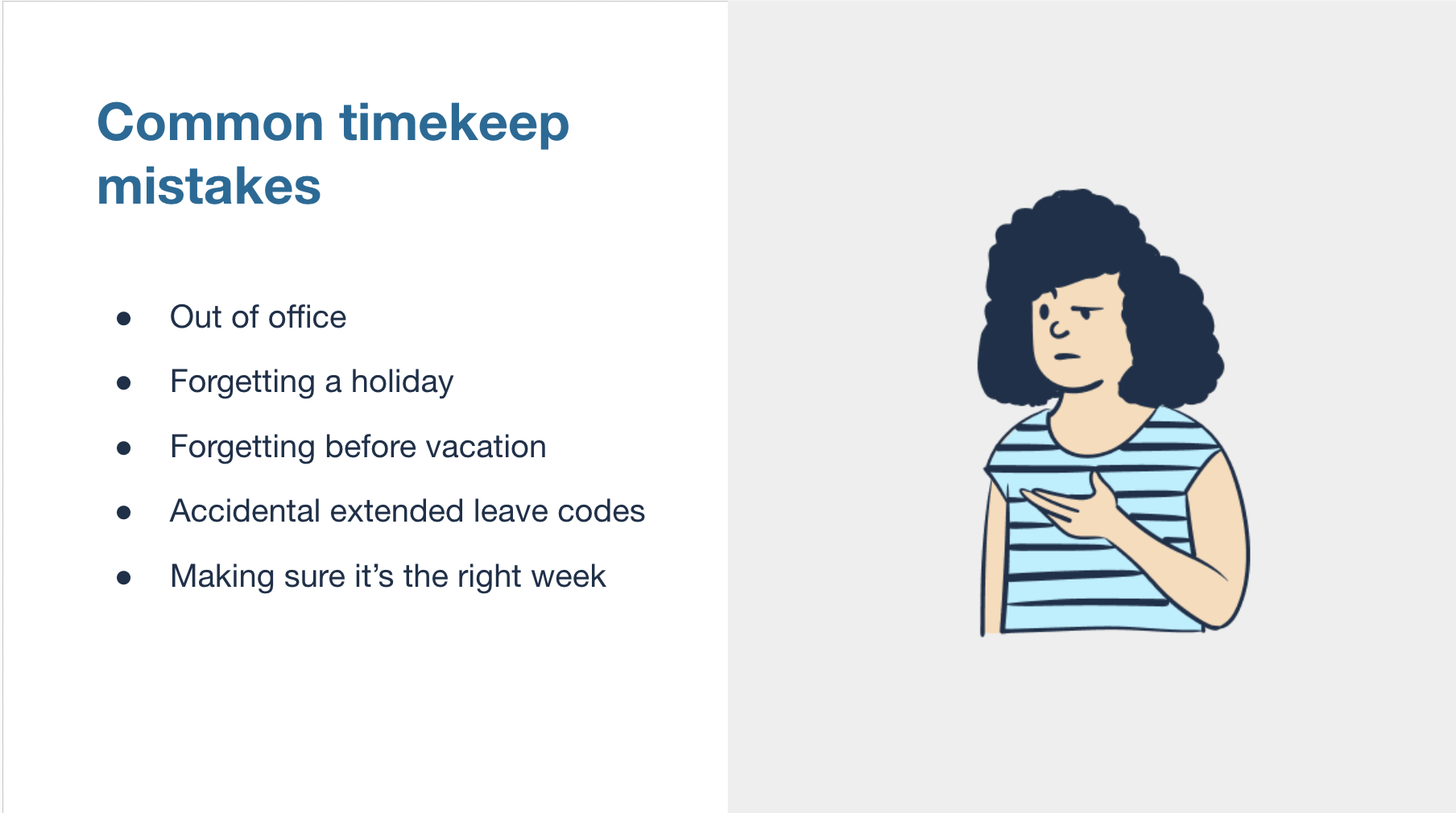
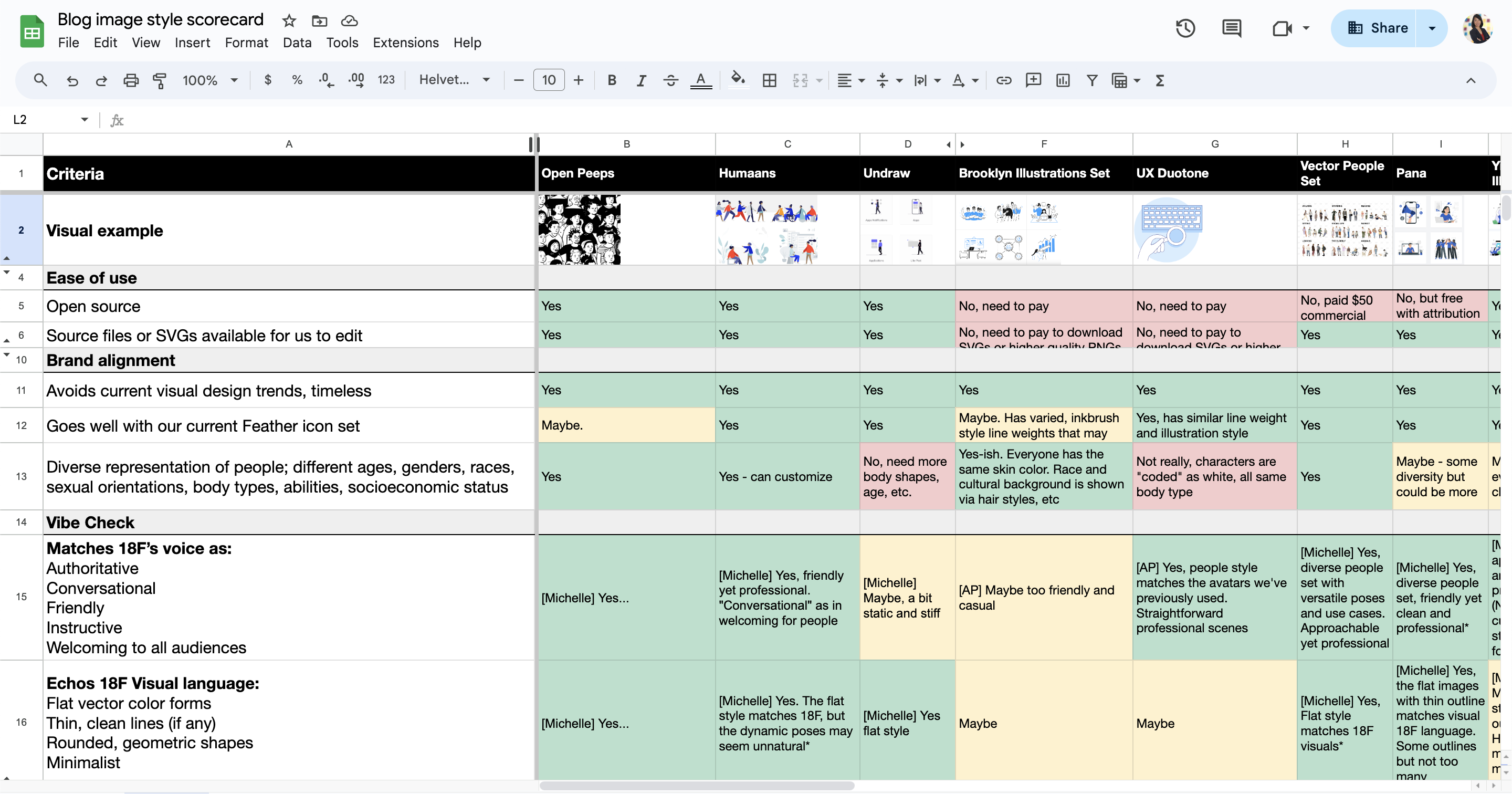
      <![CDATA[<p>Serving America’s diverse population is central to 18F’s mission. To help usfurther this effort, we’ve adopted a new illustration style to capture a broadspectrum of human experiences.</p><p>Previously, we used Pablo Stanley’s <ahref="https://blush.design/collections/rChdrB8vX8xQJunpDPp8/avatars" class="usa-link usa-link--external" class="usa-link usa-link--external" rel="noreferrer">Avataaars</a>library to represent people.</p><figure><img src="/img/avataaar_sample-_NF02blxvE.png" class="" alt="Cartoon representations of three people in a simple, vector style that shows their faces and bust." loading="lazy" decoding="async"><figcaption>Previous 18F representations of people relied onAvataaars</figcaption></figure><p>While able to depict a range of skin tones and ages, the bust portraitsultimately proved limiting when trying to represent the vast collective ofhuman experiences.</p><p>Our new image style is based on Pablo Stanley’s open-source library <ahref="https://www.openpeeps.com/" class="usa-link usa-link--external" class="usa-link usa-link--external" rel="noreferrer">Open Peeps</a>. We call our version, whichreflects the brand’s signature blue tones and flat forms, <em>18F Folks</em>.</p><p>Now our graphics look like:</p><figure><img src="/img/slide0-wU9WqDjUqB.png" class="" alt="A presentation slide showcasing a cartoon of a woman in a wheelchair holding a microphone. The text next to her says Hear, hear! We're transitioning to 18F Folks for our illustration style." loading="lazy" decoding="async"><img src="/img/slide1-X5TqYRusTb.png" class="" alt="A presentation slide with 3 vignettes of the same male in 18F Folks cartoon style. He progresses in expressions from happy, to confused, to frustrated.  Underneath each of his portrait is text as to questions or blockers he has through a generic user journey." loading="lazy" decoding="async"></figure><p>With <em>18F Folks</em>, we’re able to construct vignettes of people interacting witheach other and their environments. This helps us narrate stories about theworld we want to build.</p><figure class="no-margin"><div class="grid-row"><div class="grid-col-12 desktop:grid-col-6"><img src="/img/dc-walking-5KLrrf3EjE.png" class="" alt="A cartoon vignette with two people walking, with government buildings and trees in the background" loading="lazy" decoding="async"></div><div class="grid-col-12 desktop:grid-offset-1 desktop:grid-col-5"><img src="/img/us-map-qsKjefrLYd.png" class="" alt="Two people standing in front of a map of the US. One person appears pregnant, the other has a prosthetic leg." loading="lazy" decoding="async"></div></div>  <figcaption>The illustration library can showcase diversity, connection, and context</figcaption></figure><p>As a government agency, we use branding to inform and engage the public.Relationships emerge from the content we share. For instance, governmentagencies have reached out after reading this blog, asking how to emulatesoftware systems and service processes. Something as basic as our illustrationstyle impacts how our audience perceives us.</p><p>Consider this simple presentation slide.</p><figure><img src="/img/slide-confused-88ON-3V54o.png" class="border border-base-lighter" alt="A presentation slide showing a list on the left of common timekeep mistakes. Next to the list is a shrugging woman in the style of 18F Folks cartoon." loading="lazy" decoding="async"></figure><p>While the content presents a matter-of-fact list, the shrugging Peep conveysthe body language equivalent of “I’m with you. This is confusing.” We optedfor an illustration style that can cue understanding and trust—emotions morecomplex than the previous style would allow.</p><p>Some organizations may delegate branding directives to a marketing team.  At18F, we leverage the combined strength of our multifaceted design team tobring ideas like <em>18F Folks</em> to life. Our content designer took inspiration from18F’s written tone to inform our selection criteria, emphasizing qualitieslike “welcoming” and “conversational.” Service designers conducted research todetermine ideal use cases for illustrations.</p><p>The team then created a scorecard and conducted a comparative analysis ofseveral illustration libraries. Open Peeps was selected as the basis of the<em>18F Folks</em> style because it balances professional with approachable.</p><figure><img src="/img/scorecard-46DICmF2-F.png" class="border border-base-lighter" alt="A spreadsheet grid. The left column has criteria such as open source, matches 18F's voice, etc. The following columns determine if different visual libraries meet the criteria.  Green, yellow, and red cells suggest if criteria are met or not." loading="lazy" decoding="async"><figcaption>We created a scorecard to narrow down our options for anillustration library</figcaption></figure><p>Product managers compiled a list of additional characteristics to make the 18FFolks library even more inclusive. Considerations included diverse religiousdress, physical abilities, and body types.</p><figure class="no-margin"><div class="grid-row"><div class="grid-col-12 desktop:grid-offset-1 desktop:grid-col-6 display-flex flex-row"><img src="/img/custom2-VRwyNH7mfM.png" class="flex-align-self-center" alt="Two cartoon characters talking.  One wears a shirt with 18F, the other a shirt with a rainbow flag." loading="lazy" decoding="async"></div><div class="grid-col-12 desktop:grid-col-5"><img src="/img/custom-D41q9SXzZI.png" class="" alt="A pregnant woman stands next to a child in 18F Folks illustration style" loading="lazy" decoding="async"></div></div><figcaption>We added custom shirts, a hearing aid, as well as a pregnant person and achild. This is just the start.</figcaption></figure><p>On the surface, these depictions are simply bubbly cartoon characters. But weintentionally adopted an illustration style where more people can findthemselves reflected in the content we share. When people can see themselvesin media, they feel seen. That’s why it is so important for us to representthe diverse American public. We want every person to believe that they matterto us–that we are a government by the people, for the people. After all, goodbranding is the public celebration of a group's shared values.</p><figure><img src="/img/18f-design-custom-folk-rlN4mIRtY1.png" class="" alt="Several cartoon illustrations that staff have made of themselves in 18F Folk style." loading="lazy" decoding="async"><figcaption>18F staff customizing their own Folk</figcaption></figure><h2 class="font-heading-md" id="disclaimer-of-endorsement" tabindex="-1">Disclaimer of endorsement<a href="#disclaimer-of-endorsement" class="usa-link usa-link--external" class="heading-permalink" aria-label="Permalink for this section"><svg class="usa-icon" aria-hidden="true" focusable="false" role="img"><use xlink:href="#svg-link" class="usa-link usa-link--external"></use></svg></a></h2><p class="font-body-2xs">The GSA.gov website includes hypertext links, or pointers, to informationcreated and maintained by other public and/or private organizations. Weprovide these links and pointers only for your information and convenience.When you select a link to an outside website, you are leaving the GSA.gov siteand are subject to the privacy and security policies of the owners/sponsors ofthe outside website.</p><ul><li class="font-body-2xs">We do not control nor guarantee the accuracy, relevance, timeliness, orcompleteness of information contained on a linked website.</li><li class="font-body-2xs">We do not endorse the organizations sponsoring linked websites and we do notendorse the views they express or the products/services they offer.</li><li class="font-body-2xs">The content of external, non-Federal websites is not subject to Federalinformation quality, privacy, security, and related guidelines.</li><li class="font-body-2xs">We cannot authorize the use of copyrighted materials contained in linkedwebsites. Users must request such authorization from the sponsor of the linkedwebsite.</li><li class="font-body-2xs">We are not responsible for transmissions users receive from linked websites.</li><li class="font-body-2xs">We do not guarantee that outside websites comply with Section 508(accessibility requirements) of the Rehabilitation Act.</li></ul>]]>
    </content>
    <author>
      <name>ae7232d37</name>
    </author>
    <author>
      <name>a455c4a0d</name>
    </author>
    <category term="18F"/>
    <category term="How we work"/>
    <category term="User-centered design"/>
    <category term="Design"/>
    <summary type="html">
      <![CDATA[we've adopted a new illustration style to capture a broad spectrum of human experiences]]>
    </summary>
    <media:thumbnail xmlns:media="http://search.yahoo.com/mrss/" url="https://blog.18f.org/assets/blog/18f-folks/blog_banner.jpg"/>
    <media:content xmlns:media="http://search.yahoo.com/mrss/" medium="image" url="https://blog.18f.org/assets/blog/18f-folks/blog_banner.jpg"/>
  </entry>
  <entry>
    <title type="html"><![CDATA[ 18F’s year of launches ]]></title>
    <link href="https://blog.18f.org/2024/10/08/18f-year-of-launches/" class="usa-link usa-link--external" rel="alternate" type="text/html" title="18F’s year of launches"/>
    <published>2024-10-08T00:00:00.000Z</published>
    <updated>2024-10-08T00:00:00.000Z</updated>
    <id>https://blog.18f.org/2024/10/08/18f-year-of-launches/</id>
    <content type="html" xml:base="https://blog.18f.org/2024/10/08/18f-year-of-launches/">
      <![CDATA[<p>18F works to improve the user experience of government. Over the past year, 18F has helped amazing partner agencies launch new software products to better serve their users. Each successful launch depends on solid user research, careful product thinking, and strong team-building.</p><p>Here are six launches that 18F has supported this year.</p><h2 id="irs-direct-file-pilot-launch-with-the-internal-revenue-service-and-the-u-s-digital-service" tabindex="-1">🚀 <a href="https://directfile.irs.gov/">IRS Direct File Pilot</a> launch with the Internal Revenue Service and the U.S. Digital Service<a href="#irs-direct-file-pilot-launch-with-the-internal-revenue-service-and-the-u-s-digital-service" class="usa-link usa-link--external" class="heading-permalink" aria-label="Permalink for this section"><svg class="usa-icon" aria-hidden="true" focusable="false" role="img"><use xlink:href="#svg-link" class="usa-link usa-link--external" class="usa-link usa-link--external" class="usa-link usa-link--external" class="usa-link usa-link--external" class="usa-link usa-link--external" class="usa-link usa-link--external" class="usa-link usa-link--external" class="usa-link usa-link--external" class="usa-link usa-link--external" class="usa-link usa-link--external" class="usa-link usa-link--external" class="usa-link usa-link--external" class="usa-link usa-link--external" class="usa-link usa-link--external" class="usa-link usa-link--external" class="usa-link usa-link--external" class="usa-link usa-link--external" class="usa-link usa-link--external" class="usa-link usa-link--external" class="usa-link usa-link--external" class="usa-link usa-link--external" class="usa-link usa-link--external" class="usa-link usa-link--external" class="usa-link usa-link--external" class="usa-link usa-link--external" class="usa-link usa-link--external" class="usa-link usa-link--external" class="usa-link usa-link--external" class="usa-link usa-link--external" class="usa-link usa-link--external" class="usa-link usa-link--external" class="usa-link usa-link--external" class="usa-link usa-link--external"></use></svg></a></h2><h3 id="what" tabindex="-1">What<a href="#what" class="usa-link usa-link--external" class="heading-permalink" aria-label="Permalink for this section"><svg class="usa-icon" aria-hidden="true" focusable="false" role="img"><use xlink:href="#svg-link"></use></svg></a></h3><p>Taxpayers in 12 states used the Direct File pilot to file their taxes quickly, easily, and for free directly with the IRS.</p><h3 id="when" tabindex="-1">When<a href="#when" class="usa-link usa-link--external" class="heading-permalink" aria-label="Permalink for this section"><svg class="usa-icon" aria-hidden="true" focusable="false" role="img"><use xlink:href="#svg-link"></use></svg></a></h3><p>Public testing began in February 2024. The website opened for eligible taxpayers in pilot states in March 2024.</p><h3 id="impact" tabindex="-1">Impact<a href="#impact" class="usa-link usa-link--external" class="heading-permalink" aria-label="Permalink for this section"><svg class="usa-icon" aria-hidden="true" focusable="false" role="img"><use xlink:href="#svg-link"></use></svg></a></h3><p>Over the course of the pilot, more than 3.3 million taxpayers started the Eligibility Checker to see if they could use Direct File.</p><p>423,450 taxpayers logged into Direct File, and 140,803 taxpayers submitted accepted returns.</p><p>Direct File issued more than $90 million in tax refunds and collected $35 million in tax balances due.</p><p>More than 15,000 Direct File users participated in a <a href="https://touchpoints.digital.gov/">Touchpoints survey</a>, which found that:</p><ul><li><strong>90% of respondents</strong> ranked their experience as Excellent or Above Average.</li><li>When asked what they particularly liked, respondents most commonly cited Direct File’s ease of use, trustworthiness, and that it was free.</li><li><strong>86% of respondents</strong> said that their experience with Direct File increased their trust in the IRS.</li></ul><h2 id="get-gov-launch-with-the-cybersecurity-and-infrastructure-security-agency-cisa" tabindex="-1">🚀 <a href="https://get.gov/">get.gov</a> launch with the Cybersecurity and Infrastructure Security Agency (CISA)<a href="#get-gov-launch-with-the-cybersecurity-and-infrastructure-security-agency-cisa" class="usa-link usa-link--external" class="heading-permalink" aria-label="Permalink for this section"><svg class="usa-icon" aria-hidden="true" focusable="false" role="img"><use xlink:href="#svg-link"></use></svg></a></h2><h3 id="what-1" tabindex="-1">What<a href="#what-1" class="usa-link usa-link--external" class="heading-permalink" aria-label="Permalink for this section"><svg class="usa-icon" aria-hidden="true" focusable="false" role="img"><use xlink:href="#svg-link"></use></svg></a></h3><p>.Gov domains help the public identify official, trusted information.</p><p>Government organizations at all levels in the United States are eligible for .gov domains — this includes cities, towns, counties, election offices, states, tribal governments, courts, federal agencies, and more. Overall, more than 11,000 government organizations use .gov domains.</p><p>CISA worked with 18F to launch a new website for requesting .gov domains.</p><h3 id="when-1" tabindex="-1">When<a href="#when-1" class="usa-link usa-link--external" class="heading-permalink" aria-label="Permalink for this section"><svg class="usa-icon" aria-hidden="true" focusable="false" role="img"><use xlink:href="#svg-link"></use></svg></a></h3><p>The new <a href="https://get.gov/">get.gov</a> website launched in January 2024.</p><h3 id="impact-1" tabindex="-1">Impact<a href="#impact-1" class="usa-link usa-link--external" class="heading-permalink" aria-label="Permalink for this section"><svg class="usa-icon" aria-hidden="true" focusable="false" role="img"><use xlink:href="#svg-link"></use></svg></a></h3><p>The old domain request process required a signature, typically from a senior elected or high-ranking official. For many organizations, these requirements led to unnecessary bureaucracy that caused delays.</p><p>The new request process is fully digital, doesn’t require a physical signature, and can usually be approved by someone with significant executive responsibility in the organization, reducing delays.</p><p>The new process has also empowered CISA to adjudicate more new domains than .gov has ever done in a single year — and the year isn't finished yet.</p><h2 id="climatecorps-gov-launch-with-americorps-and-the-u-s-digital-service" tabindex="-1">🚀 <a href="https://www.acc.gov/">ClimateCorps.gov</a> launch with AmeriCorps and the U.S. Digital Service<a href="#climatecorps-gov-launch-with-americorps-and-the-u-s-digital-service" class="usa-link usa-link--external" class="heading-permalink" aria-label="Permalink for this section"><svg class="usa-icon" aria-hidden="true" focusable="false" role="img"><use xlink:href="#svg-link"></use></svg></a></h2><h3 id="what-2" tabindex="-1">What<a href="#what-2" class="usa-link usa-link--external" class="heading-permalink" aria-label="Permalink for this section"><svg class="usa-icon" aria-hidden="true" focusable="false" role="img"><use xlink:href="#svg-link"></use></svg></a></h3><p>AmeriCorps, 18F, and the U.S. Digital Service partnered to build a new website for the American Climate Corps.</p><p>The website’s goal is to make it easy for any American to find work tackling the climate crisis, while gaining the skills necessary for the clean energy and climate resilience workforce of the future.</p><h3 id="when-2" tabindex="-1">When<a href="#when-2" class="usa-link usa-link--external" class="heading-permalink" aria-label="Permalink for this section"><svg class="usa-icon" aria-hidden="true" focusable="false" role="img"><use xlink:href="#svg-link"></use></svg></a></h3><p><a href="https://www.acc.gov/">ClimateCorps.gov</a> launched on Earth Day, April 22, 2024.</p><h3 id="impact-2" tabindex="-1">Impact<a href="#impact-2" class="usa-link usa-link--external" class="heading-permalink" aria-label="Permalink for this section"><svg class="usa-icon" aria-hidden="true" focusable="false" role="img"><use xlink:href="#svg-link"></use></svg></a></h3><p>The public can use ClimateCorps.gov to find jobs advancing clean energy, conservation, and climate resilience.</p><p>ClimateCorps.gov organized information on nearly 2,000 Climate Corps positions located across 36 states, the District of Columbia, and Puerto Rico. These positions are hosted by hundreds of organizations advancing clean energy, conservation and climate resilience.</p><h2 id="national-accuracy-clearinghouse-launch-with-u-s-department-of-agriculture" tabindex="-1">🚀 <a href="https://www.fns.usda.gov/snap/nac">National Accuracy Clearinghouse</a> launch with U.S. Department of Agriculture<a href="#national-accuracy-clearinghouse-launch-with-u-s-department-of-agriculture" class="usa-link usa-link--external" class="heading-permalink" aria-label="Permalink for this section"><svg class="usa-icon" aria-hidden="true" focusable="false" role="img"><use xlink:href="#svg-link"></use></svg></a></h2><h3 id="what-3" tabindex="-1">What<a href="#what-3" class="usa-link usa-link--external" class="heading-permalink" aria-label="Permalink for this section"><svg class="usa-icon" aria-hidden="true" focusable="false" role="img"><use xlink:href="#svg-link"></use></svg></a></h3><p>The National Accuracy Clearinghouse (NAC) is a data matching system designed to ensure individuals are not receiving Supplemental Nutrition Assistance Program (SNAP) in more than one state at the same time.</p><p>The National Accuracy Clearinghouse was established as a result of the 2018 Farm Bill.</p><p>The goals of the NAC are to:</p><ul><li>enhance SNAP program integrity</li><li>reduce improper payments</li><li>improve the customer experience for participants who move from one state to another by ensuring timely, fair, and accurate benefit decisions</li></ul><h3 id="when-3" tabindex="-1">When<a href="#when-3" class="usa-link usa-link--external" class="heading-permalink" aria-label="Permalink for this section"><svg class="usa-icon" aria-hidden="true" focusable="false" role="img"><use xlink:href="#svg-link"></use></svg></a></h3><p>The National Accuracy Clearinghouse launched with its first two participating states in February 2024.</p><h3 id="impact-3" tabindex="-1">Impact<a href="#impact-3" class="usa-link usa-link--external" class="heading-permalink" aria-label="Permalink for this section"><svg class="usa-icon" aria-hidden="true" focusable="false" role="img"><use xlink:href="#svg-link"></use></svg></a></h3><p>The NAC is improving program access and customer experience by facilitating state-to-state communication to help state agencies promptly and accurately process SNAP recipient moves from one state to another.</p><p>Since February, a total of five states have implemented the NAC, with all SNAP state agencies working toward nationwide implementation.</p><h2 id="notify-gov-launch-with-gsa-public-benefits-studio" tabindex="-1">🚀 <a href="https://notify.gov/">Notify.gov</a> launch with GSA Public Benefits Studio<a href="#notify-gov-launch-with-gsa-public-benefits-studio" class="usa-link usa-link--external" class="heading-permalink" aria-label="Permalink for this section"><svg class="usa-icon" aria-hidden="true" focusable="false" role="img"><use xlink:href="#svg-link"></use></svg></a></h2><h3 id="what-4" tabindex="-1">What<a href="#what-4" class="usa-link usa-link--external" class="heading-permalink" aria-label="Permalink for this section"><svg class="usa-icon" aria-hidden="true" focusable="false" role="img"><use xlink:href="#svg-link"></use></svg></a></h3><p>Notify.gov is a new text messaging service from GSA’s <a href="https://digital.gov/2023/02/07/collaborate-with-the-tts-public-benefits-studio/">Public Benefits Studio</a>. Notify.gov helps government agencies meet people where they are, by lowering barriers to texting and enabling agencies to easily send customized, bulk text messages to the people they serve. 18F worked with the Public Benefits Studio on the development of Notify.gov by providing research, design, and engineering support.</p><h3 id="when-4" tabindex="-1">When<a href="#when-4" class="usa-link usa-link--external" class="heading-permalink" aria-label="Permalink for this section"><svg class="usa-icon" aria-hidden="true" focusable="false" role="img"><use xlink:href="#svg-link"></use></svg></a></h3><p>In the summer of 2023, Notify.gov launched its first pilot partnerships with state and local agencies administering SNAP and Medicaid.</p><p>In November 2023, the <a href="https://www.gsa.gov/blog/2024/03/18/notifygov-is-helping-government-meet-families-where-they-are">first messages were sent to the public with Notify.gov by the Department of Human Services in Norfolk, Virginia</a>.</p><h3 id="impact-4" tabindex="-1">Impact<a href="#impact-4" class="usa-link usa-link--external" class="heading-permalink" aria-label="Permalink for this section"><svg class="usa-icon" aria-hidden="true" focusable="false" role="img"><use xlink:href="#svg-link"></use></svg></a></h3><p>Texting is a proven way to improve the public’s experience of government, deliver better program outcomes, and reduce administrative costs — and Notify.gov is a trustworthy and easy-to-use onramp to help government agencies get started texting.</p><p>To date, state, local, and federal pilot partners have sent over 60,000 messages using Notify.gov. These messages have helped people:</p><ul><li><strong>keep their health care coverage</strong>, by informing Medicaid recipients that they need to renew their coverage</li><li><strong>protect their benefits</strong>, by alerting them that their EBT may have been compromised</li><li><strong>avoid passport processing delays</strong>, by informing applicants that they need to submit a new photo.</li></ul><p>Notify.gov is growing rapidly, and has received interest from more than 100 programs in at least 30 states, 10 counties, 12 cities, and 18 federal agencies. To learn more and get started with Notify.gov, contact the team at <a href="mailto:tts-notify@gsa.gov">tts-notify@gsa.gov</a>.</p><h2 id="federal-audit-clearinghouse-launch-with-the-office-of-regulatory-and-oversight-systems-presidential-innovation-fellows-and-10x" tabindex="-1">🚀 <a href="https://www.fac.gov/">Federal Audit Clearinghouse</a> launch with the Office of Regulatory and Oversight Systems, Presidential Innovation Fellows, and 10x<a href="#federal-audit-clearinghouse-launch-with-the-office-of-regulatory-and-oversight-systems-presidential-innovation-fellows-and-10x" class="usa-link usa-link--external" class="heading-permalink" aria-label="Permalink for this section"><svg class="usa-icon" aria-hidden="true" focusable="false" role="img"><use xlink:href="#svg-link"></use></svg></a></h2><h3 id="what-5" tabindex="-1">What<a href="#what-5" class="usa-link usa-link--external" class="heading-permalink" aria-label="Permalink for this section"><svg class="usa-icon" aria-hidden="true" focusable="false" role="img"><use xlink:href="#svg-link"></use></svg></a></h3><p>All entities that spend $750,000 or more in federal grant funds in a fiscal year must submit an audit to the federal government.The Office of Regulatory and Oversight Systems (OROS) within the General Services Administration created a new Federal Audit Clearinghouse for grantees, with the goals of:</p><ul><li>delivering a maintainable new system</li><li>seamlessly transitioning users from the old system to the new one</li><li>making audit data more transparent</li></ul><h4 id="who" tabindex="-1">Who<a href="#who" class="usa-link usa-link--external" class="heading-permalink" aria-label="Permalink for this section"><svg class="usa-icon" aria-hidden="true" focusable="false" role="img"><use xlink:href="#svg-link"></use></svg></a></h4><p>The new site was built and launched by the Office of Regulatory and Oversight Systems with support from many parts of government, including <a href="https://presidentialinnovationfellows.gov/">Presidential Innovation Fellows</a>, <a href="https://10x.gsa.gov/">10x</a>, and 18F.</p><h3 id="when-5" tabindex="-1">When<a href="#when-5" class="usa-link usa-link--external" class="heading-permalink" aria-label="Permalink for this section"><svg class="usa-icon" aria-hidden="true" focusable="false" role="img"><use xlink:href="#svg-link"></use></svg></a></h3><p>The new Federal Audit Clearinghouse site launched in October 2023.</p><h3 id="impact-5" tabindex="-1">Impact<a href="#impact-5" class="usa-link usa-link--external" class="heading-permalink" aria-label="Permalink for this section"><svg class="usa-icon" aria-hidden="true" focusable="false" role="img"><use xlink:href="#svg-link"></use></svg></a></h3><p>The modernized Federal Audit Clearinghouse serves hundreds of thousands of users who interact with hundreds of billions of dollars in federal grant funding each year.</p><p>Launching the new site allowed Census to successfully retire its legacy system. Customer satisfaction with the new website helpdesk is trending over 95%.</p><h2 id="work-with-us" tabindex="-1">Work with us<a href="#work-with-us" class="usa-link usa-link--external" class="heading-permalink" aria-label="Permalink for this section"><svg class="usa-icon" aria-hidden="true" focusable="false" role="img"><use xlink:href="#svg-link"></use></svg></a></h2><p>Work in government? Want to see your agency launch software products like these? Reach out at <a href="mailto:Inquiries18F@gsa.gov">Inquiries18F@gsa.gov</a>.</p><hr><h3 id="links" tabindex="-1">Links<a href="#links" class="usa-link usa-link--external" class="heading-permalink" aria-label="Permalink for this section"><svg class="usa-icon" aria-hidden="true" focusable="false" role="img"><use xlink:href="#svg-link"></use></svg></a></h3><h4 id="irs-direct-file" tabindex="-1">IRS Direct File<a href="#irs-direct-file" class="usa-link usa-link--external" class="heading-permalink" aria-label="Permalink for this section"><svg class="usa-icon" aria-hidden="true" focusable="false" role="img"><use xlink:href="#svg-link"></use></svg></a></h4><ul><li><a href="https://www.irs.gov/newsroom/eligible-taxpayers-in-12-states-can-file-for-free-with-irs-direct-file">Eligible taxpayers in 12 states can file for free with IRS Direct File</a></li><li><a href="https://www.irs.gov/pub/irs-pdf/p5969.pdf">IRS Direct File Pilot Program Filing Season 2024 After Action Report</a></li><li><a href="https://www.irs.gov/about-irs/strategic-plan/irs-direct-file-news">IRS Direct File pilot news</a></li></ul><h4 id="get-gov" tabindex="-1">get.gov<a href="#get-gov" class="usa-link usa-link--external" class="heading-permalink" aria-label="Permalink for this section"><svg class="usa-icon" aria-hidden="true" focusable="false" role="img"><use xlink:href="#svg-link"></use></svg></a></h4><ul><li><a href="https://get.gov/posts/2024-01-31-new-way-to-get-a-.gov/">Getting a .gov just got easier</a></li><li><a href="https://get.gov/domains/benefits/">Benefits of .gov domains</a></li><li><a href="https://github.com/cisagov/dotgov-data" class="usa-link usa-link--external" class="usa-link usa-link--external" rel="noreferrer">dotgov-data on GitHub</a></li></ul><h4 id="climatecorps-gov" tabindex="-1">ClimateCorps.gov<a href="#climatecorps-gov" class="usa-link usa-link--external" class="heading-permalink" aria-label="Permalink for this section"><svg class="usa-icon" aria-hidden="true" focusable="false" role="img"><use xlink:href="#svg-link"></use></svg></a></h4><ul><li><a href="https://americorps.gov/newsroom/press-release/biden-harris-administration-announces-major-steps-stand-landmark-american">AmeriCorps Newsroom</a></li><li><a href="https://www.whitehouse.gov/briefing-room/statements-releases/2024/04/22/fact-sheet-president-biden-marks-earth-day-2024-with-historic-climate-action/">Whitehouse.gov Fact Sheet</a></li></ul><h4 id="national-accuracy-clearinghouse" tabindex="-1">National Accuracy Clearinghouse<a href="#national-accuracy-clearinghouse" class="usa-link usa-link--external" class="heading-permalink" aria-label="Permalink for this section"><svg class="usa-icon" aria-hidden="true" focusable="false" role="img"><use xlink:href="#svg-link"></use></svg></a></h4><ul><li><a href="https://www.fns.usda.gov/snap/nac">SNAP National Accuracy Clearinghouse (NAC)</a></li></ul><h4 id="notify-gov" tabindex="-1">Notify.gov<a href="#notify-gov" class="usa-link usa-link--external" class="heading-permalink" aria-label="Permalink for this section"><svg class="usa-icon" aria-hidden="true" focusable="false" role="img"><use xlink:href="#svg-link"></use></svg></a></h4><ul><li><a href="https://www.gsa.gov/blog/2023/12/14/gsa-launches-pilot-partnerships-to-help-people-get-benefits-through-text-messaging">GSA launches pilot partnerships to help people get benefits through text messaging</a></li><li><a href="https://digital.gov/2023/02/07/collaborate-with-the-tts-public-benefits-studio/">Collaborate with the TTS Public Benefits Studio – Digital.gov</a></li></ul><h4 id="federal-audit-clearinghouse" tabindex="-1">Federal Audit Clearinghouse<a href="#federal-audit-clearinghouse" class="usa-link usa-link--external" class="heading-permalink" aria-label="Permalink for this section"><svg class="usa-icon" aria-hidden="true" focusable="false" role="img"><use xlink:href="#svg-link"></use></svg></a></h4><ul><li><a href="https://www.fac.gov/welcome/">Welcome to the FAC</a></li><li><a href="https://10x.gsa.gov/impact/fy22-report/">10x FY22 Impact Report, 10x</a></li><li><a href="https://github.com/GSA-TTS/FAC/blob/main/docs/product/roadmap.md" class="usa-link usa-link--external" class="usa-link usa-link--external" rel="noreferrer">FAC Product Vision on GitHub</a></li></ul>]]>
    </content>
    <author>
      <name>a41bd9d7c</name>
    </author>
    <category term="18F"/>
    <category term="Agency work"/>
    <category term="Product"/>
    <summary type="html">
      <![CDATA[Over the past year, 18F has helped amazing partner agencies launch new software products to better serve their users.Here are six launches that 18F has supported this year.]]>
    </summary>
    <media:thumbnail xmlns:media="http://search.yahoo.com/mrss/" url="https://blog.18f.org/assets/blog/year-of-launches/header.png"/>
    <media:content xmlns:media="http://search.yahoo.com/mrss/" medium="image" url="https://blog.18f.org/assets/blog/year-of-launches/header.png"/>
  </entry>
  <entry>
    <title type="html"><![CDATA[ A revised and expanded guide for de-risking government technology projects ]]></title>
    <link href="https://blog.18f.org/2024/09/12/derisking-guide-update/" class="usa-link usa-link--external" rel="alternate" type="text/html" title="A revised and expanded guide for de-risking government technology projects"/>
    <published>2024-09-12T00:00:00.000Z</published>
    <updated>2024-09-12T00:00:00.000Z</updated>
    <id>https://blog.18f.org/2024/09/12/derisking-guide-update/</id>
    <content type="html" xml:base="https://blog.18f.org/2024/09/12/derisking-guide-update/">
      <![CDATA[<p>Today we launch a new version of the <a href="https://18f.org/guides/derisking-government-tech/" class="usa-link usa-link--external" class="usa-link usa-link--external" class="usa-link usa-link--external" rel="noreferrer">De-risking Government Technology Guide</a>, its first update since being published in 2020. Find all the recommendations from the original guide’s two parts—the State Software Budgeting Handbook and the Federal Field Guide—now in one unified package. Plus, there's a new, in-depth section on vendor management!</p><p>Government technology projects face challenges to successful delivery from budgeting through post-award. To lower risk of failure at any stage, the guide offers methods, models, and examples that reflect:</p><ul><li>Best practices in modern software development</li><li>18F’s experience working with federal and state partners</li><li>Input from state employees</li></ul><p>Topics covered include:</p><ul><li>The differences and trade-offs between commercial and custom software</li><li>Key principles for effective custom software development</li><li>How (and why) to buy custom software development services using performance-based services contracting</li><li>How to work with a vendor development team to deliver human-centered software quickly</li></ul><p>These changes respond to current government agency needs. As part of the Office of Management and Budget’s <a href="https://www.performance.gov/cx/life-experiences/facing-a-financial-shock/">Facing a Financial Shock initiative</a>, an 18F team talked with state employees about challenges to procuring and developing state benefits technology systems and possible improvements. Staff expressed a strong desire for federally authored resources about managing technology projects and enabling successful vendor performance. The revised guide is a resource for both.</p><p>The changes also reflect the core 18F value to iterate. The guide's original authors hoped it would be revised over time. As we're able, we'll continue to do so.</p><p>Check out the <a href="https://18f.org/guides/derisking-government-tech/" class="usa-link usa-link--external" rel="noreferrer">new guide online</a> and in <a href="https://18f.org/guides/assets/derisking-government-tech/dist/18f-derisking-guide.pdf" class="usa-link usa-link--external" class="usa-link usa-link--external" rel="noreferrer">PDF</a>. You can also read the <a href="https://www.gsa.gov/blog/2024/09/11/a-revised-and-expanded-guide-for-derisking-government-technology-projects">GSA.gov press release</a> about the new guide. Share it around. Suggestions, questions, and feedback are welcome! Please reach out through the <a href="https://github.com/18F/guides/issues/new/choose" class="usa-link usa-link--external" class="usa-link usa-link--external" rel="noreferrer">18F Guides GitHub repo</a>.</p>]]>
    </content>
    <author>
      <name>adc77f927</name>
    </author>
    <category term="Best practices"/>
    <category term="How we work"/>
    <category term="Lessons learned"/>
    <summary type="html">
      <![CDATA[New content on vendor management and a streamlined structure make one of 18F's most popular guides even more useful for government staff.]]>
    </summary>
  </entry>
  <entry>
    <title type="html"><![CDATA[ Andrew Hyder Government Service Improvement Award recognizes commitment to serving the public ]]></title>
    <link href="https://blog.18f.org/2024/08/20/andrew-hyder-award/" class="usa-link usa-link--external" rel="alternate" type="text/html" title="Andrew Hyder Government Service Improvement Award recognizes commitment to serving the public"/>
    <published>2024-08-20T00:00:00.000Z</published>
    <updated>2024-08-20T00:00:00.000Z</updated>
    <id>https://blog.18f.org/2024/08/20/andrew-hyder-award/</id>
    <content type="html" xml:base="https://blog.18f.org/2024/08/20/andrew-hyder-award/">
      <![CDATA[<p>TTS is proud to present the 2024 Andrew Hyder Government Service Improvement Award to [Bashful Stoat]<a href="#anonymous" class="usa-link usa-link--external" class="usa-link usa-link--external" class="usa-link usa-link--external" class="usa-link usa-link--external" class="usa-link usa-link--external" class="usa-link usa-link--external" class="usa-link usa-link--external" class="usa-link usa-link--external" class="usa-link usa-link--external" class="usa-link usa-link--external" class="usa-link usa-link--external" class="usa-link usa-link--external" class="usa-link usa-link--external" class="usa-link usa-link--external" class="usa-link usa-link--external" style="display:inline!important;" title="Names are anonymized">*</a>.</p><p>[Bashful]<a href="#anonymous" style="display:inline!important;" title="Names are anonymized">*</a> is the lead Security Engineer on the TTS DevTools program, an internal shared service focused on providing key secure software development tools and building blocks in order to reduce the time and cost of starting and maintaining public digital services. [Bashful]<a href="#anonymous" style="display:inline!important;" title="Names are anonymized">*</a> synthesizes his extensive development skills, applied technical security expertise, and his battle-tested ATO experience to bake it all into everything DevTools provides in order to allow dedicated civic technologists to focus on solving problems for the public instead of meeting ever-growing compliance requirements.</p><p>In a Hyder Award first, [Bashful]<a href="#anonymous" style="display:inline!important;" title="Names are anonymized">*</a> was nominated by two different people for his work on the IRS Direct File project. From his nominations:</p><p>In 2023 and 2024, the IRS partnered with the U.S. Digital Service and 18F to form a blended team of federal employees and contractors to design, build, and implement the IRS Direct File pilot. Direct File gave taxpayers the option to file their federal tax return directly with the IRS for free.</p><p>[Bashful]<a href="#anonymous" style="display:inline!important;" title="Names are anonymized">*</a> joined the effort as a lead engineer during the summer of 2023 and the project was successful, in part, because of [Bashful]<a href="#anonymous" style="display:inline!important;" title="Names are anonymized">*</a>'s involvement, experience, and working approach. Throughout the process [Bashful]<a href="#anonymous" style="display:inline!important;" title="Names are anonymized">*</a> collaborated with colleagues at the IRS and USDS to advocate for the end users and to implement agile, iterative development practices.</p><p>Although the approaches and preferences of each group were different, [Bashful]<a href="#anonymous" style="display:inline!important;" title="Names are anonymized">*</a> was able to find common ground between them to push forward a high stakes, stressful project that was ultimately one of the most successful government tech stories of the past decade.</p><p>[Bashful]<a href="#anonymous" style="display:inline!important;" title="Names are anonymized">*</a> led Direct File’s work to achieve Authority to Operate (ATO) and One Solution Delivery Life Cycle Guidance (OneSDLC). Both were secured on a remarkably fast 9-month timeline, enabling Direct File to be released to the public for tax filing season.</p><p>Simultaneously, with three months until a launch deadline, he flagged critical opportunities to strengthen the production environment, setting Direct File up for success. [Bashful]<a href="#anonymous" style="display:inline!important;" title="Names are anonymized">*</a> then organized and led a vital Path-to-Production sprint across organizations within IRS ahead of the pilot launch. [Bashful]<a href="#anonymous" style="display:inline!important;" title="Names are anonymized">*</a>’s unwavering commitment to get the pilot into users' hands for the tax filing season made it possible for many people to file taxes with less confusion and anxiety.</p><p>[Bashful]<a href="#anonymous" style="display:inline!important;" title="Names are anonymized">*</a>’s leadership and unwavering commitment to iterative and secure development also allowed the team to practice agile and user-centered design and development while still meeting governance and compliance requirements. This directly resulted in a secure, safe, and stable Direct File pilot that protected the privacy of taxpayers.</p><p>Not only did [Bashful]<a href="#anonymous" style="display:inline!important;" title="Names are anonymized">*</a> bring these ideals to the IRS, he also openly shared what he learned from the Direct File experience with TTS colleagues to better prepare them for future, similar engagements. His current work building internal compliance tools at TTS enables teams to more quickly and reliably build secure software for partners across the government.</p><p>“I am proud of what we were able to accomplish this filing season. I’m proud of the success of the Direct File pilot. I also acknowledge that there’s a lot more work to do and as I look across the IRS, there are areas where we can learn from the success of the Direct File and our own technology operations and our own management success. I’m going to learn from it as well.” – IRS Commissioner Danny Werfel.</p><p>[Bashful]<a href="#anonymous" style="display:inline!important;" title="Names are anonymized">*</a> lives in Baltimore with his wife and their two school-age daughters. He describes his hobbies as “pretty varied, which inevitably leads me to not spending as much time on any one of them as I’d like”. Those hobbies include bicycling, hiking, camping, woodworking, cooking, baking, and yoga.</p><p>His career aspirations include being part of a build-to-buy team writing software that is released to production for real end-users. He’d also really like to have an impact on the ATO process by working directly with an OCIO shop to improve their workflows, instead of just working within the confines of a single application.</p><p><em>The Andrew Hyder Government Service Improvement Award commemorates the life and work of Andrew Hyder, a dedicated public servant and community organizer who brought together activists, technologists, community members, and others to improve the way that governments delivered services to those in need. It is presented annually to one or more federal employees who demonstrate both excellence in their work and a commitment to improving the public’s experience with government.</em></p>]]>
    </content>
    <author>
      <name>a0e7a82ed</name>
    </author>
    <summary type="html">
      <![CDATA[TTS is proud to present the 2024 Andrew Hyder Government Service Improvement Award to [Bashful Stoat]<a href="#anonymous" style="display:inline!important;" title="Names are anonymized">&#42;</a>.]]>
    </summary>
  </entry>
  <entry>
    <title type="html"><![CDATA[ Working with Oracle databases in open-source projects ]]></title>
    <link href="https://blog.18f.org/2024/07/17/working-with-oracle-databases-in-open-source-projects/" class="usa-link usa-link--external" rel="alternate" type="text/html" title="Working with Oracle databases in open-source projects"/>
    <published>2024-07-17T00:00:00.000Z</published>
    <updated>2024-07-17T00:00:00.000Z</updated>
    <id>https://blog.18f.org/2024/07/17/working-with-oracle-databases-in-open-source-projects/</id>
    <content type="html" xml:base="https://blog.18f.org/2024/07/17/working-with-oracle-databases-in-open-source-projects/">
      <![CDATA[<p><em>Reference to any non-federal entity does not constitute or imply its endorsement, recommendation, or favoring by GSA.</em></p><h2 id="introduction" tabindex="-1">Introduction<a href="#introduction" class="usa-link usa-link--external" class="heading-permalink" aria-label="Permalink for this section"><svg class="usa-icon" aria-hidden="true" focusable="false" role="img"><use xlink:href="#svg-link" class="usa-link usa-link--external" class="usa-link usa-link--external" class="usa-link usa-link--external" class="usa-link usa-link--external" class="usa-link usa-link--external" class="usa-link usa-link--external" class="usa-link usa-link--external" class="usa-link usa-link--external" class="usa-link usa-link--external" class="usa-link usa-link--external" class="usa-link usa-link--external" class="usa-link usa-link--external" class="usa-link usa-link--external" class="usa-link usa-link--external" class="usa-link usa-link--external" class="usa-link usa-link--external" class="usa-link usa-link--external" class="usa-link usa-link--external" class="usa-link usa-link--external"></use></svg></a></h2><p>During a recent 18F project, we built an open-source prototype with a twist: all of the data for our project was locked in a closed-source Oracle database, with no way to export it to an open format.</p><p>After days of cobbling together research from across the internet, we managed to set up an Oracle database and connect it to an open-source web application. This is the post we wish we had when we started.</p><p>If you need an Oracle database in your open-source project, quickly and for free, then welcome to our step-by-step technical tutorial. Fun fact: this is 18F's first technical tutorial blog post <a href="/2016/04/08/how-we-get-high-availability-with-elasticsearch-and-ruby-on-rails/" class="usa-link usa-link--external">since 2016</a>!</p><h3 id="before-you-begin" tabindex="-1">Before you begin<a href="#before-you-begin" class="usa-link usa-link--external" class="heading-permalink" aria-label="Permalink for this section"><svg class="usa-icon" aria-hidden="true" focusable="false" role="img"><use xlink:href="#svg-link"></use></svg></a></h3><p>In writing this tutorial, we assume you're already familiar with <a href="/2015/03/03/how-to-use-github-and-the-terminal-a-guide/" class="usa-link usa-link--external">using the command line</a>, and with the basics of setting up and connecting to Docker containers. We use Macs at 18F, but if you use Windows, nearly everything except file path formats should be the same.</p><p><strong>By the end of this tutorial</strong>, we expect that you'll have a working Oracle database running in Docker. We will provide guidance on importing data, but we can't guarantee you'll have everything fully imported — it depends largely on the nature of your data.</p><h4 id="our-challenge" tabindex="-1">Our challenge<a href="#our-challenge" class="usa-link usa-link--external" class="heading-permalink" aria-label="Permalink for this section"><svg class="usa-icon" aria-hidden="true" focusable="false" role="img"><use xlink:href="#svg-link"></use></svg></a></h4><p>During a recent project, we were developing an open-source prototype that was all about the data — everything we prototyped had something to do with the data model, how data was stored, and what needed to happen to get the data ready to transform.</p><p>So, we needing realistic data, and we received approval to use data from a non-production database.</p><p>The only data we could access, however, was a database export file from a no-longer-supported Oracle 12c database.</p><p>We hoped we could simply convert the data to something usable <a href="https://18f.org/guides/engineering/tools/datastore-selection" class="usa-link usa-link--external" class="usa-link usa-link--external" rel="noreferrer">in our default database, Postgres</a>. However, it’s not trivial to convert data between database platforms, and tools that offer conversion between Oracle and Postgres are either costly, not secure, or excessively challenging to understand and use.</p><p>We considered asking the database administrator re-export to CSV, but we needed the full dataset of several hundred thousand rows with all their relationships preserved. CSV export would only be appropriate if we needed just a handful of tables, or could live without those relationships.</p><p>We decided we needed the full database to accomplish the prototype’s objectives. Procuring an Oracle database wasn’t an option on our timeline.</p><p>So — what to do?</p><h4 id="discovering-oracles-free-databases" tabindex="-1">Discovering Oracle’s free databases<a href="#discovering-oracles-free-databases" class="usa-link usa-link--external" class="heading-permalink" aria-label="Permalink for this section"><svg class="usa-icon" aria-hidden="true" focusable="false" role="img"><use xlink:href="#svg-link"></use></svg></a></h4><p>Fortunately, we discovered that Oracle provides two free versions of their database — Oracle Free and Oracle Express Edition (XE).</p><p>Both databases provide a single database instance that can hold up to 12 GB. We couldn't discern any meaningful differences between these databases — as far as we can tell, the primary difference is the name. The only other difference we spotted was that, when we imported data into Free, we noticed about 3% fewer data import errors than when we imported into Express.</p><p>Both databases are available on <a href="https://container-registry.oracle.com" class="usa-link usa-link--external" class="usa-link usa-link--external" rel="noreferrer">Oracle's container registry, container-registry.oracle.com</a>. You don’t need an Oracle account to access the free databases, but you do have to get them from Oracle’s registry — neither database image is available on Docker Hub.</p><p>If your database is larger than 12 GB, you may need to export a smaller subset of your data. In our case, the tabular data itself was almost 12 GB in size. We were able to load all of the tabular data, but other objects like indices and constraints were dropped during import because they didn’t fit inside that 12 GB. Fortunately, we didn’t need those additional objects, and the database continued working well enough.</p><p>We arbitrarily chose Express to start with, so this tutorial will cover Express. If you choose to use Free, make sure to change the image URL and the database name in the examples below.</p><p>Ok, let’s start the tutorial!</p><h2 id="tutorial" tabindex="-1">Tutorial<a href="#tutorial" class="usa-link usa-link--external" class="heading-permalink" aria-label="Permalink for this section"><svg class="usa-icon" aria-hidden="true" focusable="false" role="img"><use xlink:href="#svg-link"></use></svg></a></h2><p>This tutorial uses curly braces <code>{{ }}</code> to indicate when you should replace something with your own information. For example, if your Oracle database password is `&quot;my-secure-password&quot; (don't use this), and you see a block like</p><pre class="shiki github-light" style="background-color: #ffffff; color: #24292f"><div class='code-container'><code><div class='line'><span style="color: undefined">ORACLE_PASSWORD={{ your secure password }}</span></div></code></div></pre><p>your version should look like</p><pre class="shiki github-light" style="background-color: #ffffff; color: #24292f"><div class='code-container'><code><div class='line'><span style="color: undefined">ORACLE_PASSWORD=my-secure-password</span></div></code></div></pre><h3 id="part-1-running-an-oracle-database-using-docker" tabindex="-1">Part 1: Running an Oracle database using Docker<a href="#part-1-running-an-oracle-database-using-docker" class="usa-link usa-link--external" class="heading-permalink" aria-label="Permalink for this section"><svg class="usa-icon" aria-hidden="true" focusable="false" role="img"><use xlink:href="#svg-link"></use></svg></a></h3><p>We’ll use Docker Compose to install and run an Oracle database. Once we have an empty database running, we'll start importing data in Part 2 below.</p><h4 id="setting-up-the-container" tabindex="-1">Setting up the container<a href="#setting-up-the-container" class="usa-link usa-link--external" class="heading-permalink" aria-label="Permalink for this section"><svg class="usa-icon" aria-hidden="true" focusable="false" role="img"><use xlink:href="#svg-link"></use></svg></a></h4><p>Let's think through the setup before we run any code.</p><p>First, we know want any data we import into the Oracle database to persist (stick around) even if the container stops or crashes. To make sure that the data in the database persists, we’ll create a volume that links to the Oracle data directory. The details of how Docker volumes work are outside the scope of this tutorial, but you can always go to Docker to read up.</p><p>Second, we want to make sure the Oracle database can see the data file we’re going to import into the database. (This tutorial assumes you have a data file exported from another Oracle database.) So, we’ll create a second volume that connects the folder containing our data import file to a folder in the container. That way, when we tell the database to import the file, it can find it.</p><p>Let’s run the container for the first time, with our two volumes and a few more features we’ll explain in a moment!</p><p>First, set up a docker-compose.yml file with the following content:</p><pre class="shiki github-light" style="background-color: #ffffff; color: #24292f"><div class='code-container'><code><div class='line'><span style="color: undefined">docker-compose.yml</span></div></code></div></pre><pre class="shiki github-light" style="background-color: #ffffff; color: #24292f"><div class="language-id">yaml</div><div class='code-container'><code><div class='line'><span style="color: #116329">version</span><span style="color: #24292F">: </span><span style="color: #0A3069">'3'</span></div><div class='line'></div><div class='line'><span style="color: #116329">services</span><span style="color: #24292F">:</span></div><div class='line'><span style="color: #24292F">  </span><span style="color: #116329">oracledb</span><span style="color: #24292F">:</span></div><div class='line'><span style="color: #24292F">    </span><span style="color: #116329">image</span><span style="color: #24292F">: </span><span style="color: #0A3069">container-registry.oracle.com/database/express:21.3.0-xe</span></div><div class='line'><span style="color: #24292F">    </span><span style="color: #116329">volumes</span><span style="color: #24292F">:</span></div><div class='line'><span style="color: #24292F">      - </span><span style="color: #0A3069">${FOLDER_WITH_IMPORT_FILE}:/db/data</span></div><div class='line'><span style="color: #24292F">      - </span><span style="color: #0A3069">oracle_data_volume:/opt/oracle/</span></div><div class='line'><span style="color: #24292F">    </span><span style="color: #116329">ports</span><span style="color: #24292F">:</span></div><div class='line'><span style="color: #24292F">      - </span><span style="color: #0A3069">1521:1521</span></div><div class='line'><span style="color: #24292F">    </span><span style="color: #116329">environment</span><span style="color: #24292F">:</span></div><div class='line'><span style="color: #24292F">      - </span><span style="color: #0A3069">ORACLE_PWD=${ORACLE_PASSWORD}</span></div><div class='line'></div><div class='line'><span style="color: #116329">volumes</span><span style="color: #24292F">:</span></div><div class='line'><span style="color: #24292F">  </span><span style="color: #116329">oracle_data_volume</span><span style="color: #24292F">:</span></div></code></div></pre><p>Next, let’s set up an environment file (<code>.env</code>) that contains the Oracle username, the Oracle password, and information about the file we want to import. We’ll keep this separate from docker-compose.yml so that secrets that could make hacking easier — username, password, info about your filesystem — aren’t published. Make sure that .env cannot be checked into your version control system, so add it to your global .gitignore.</p><p>Generate a random password for your database by running a command like <code>openssl rand -base64 24</code>. Make sure the only special characters in the password are <code>_</code>, <code>$</code>, and <code>#</code>, since Oracle has a hard time with special characters other than these. Then set this value as the <code>ORACLE_PASSWORD</code> in the <code>.env</code> file.</p><pre class="shiki github-light" style="background-color: #ffffff; color: #24292f"><div class='code-container'><code><div class='line'><span style="color: undefined">.env</span></div></code></div></pre><pre class="shiki github-light" style="background-color: #ffffff; color: #24292f"><div class="language-id">sh</div><div class='code-container'><code><div class='line'><span style="color: #24292F">ORACLE_USER=system</span></div><div class='line'><span style="color: #24292F">ORACLE_PASSWORD={{ your secure password }}</span></div><div class='line'><span style="color: #24292F">IMPORT_FILE={{ name of the file to import, e.g. export.dmp }}</span></div><div class='line'><span style="color: #24292F">FOLDER_WITH_IMPORT_FILE={{ folder containing the import file as a path relative to the Docker Compose file, e.g. ./db/data }}</span></div></code></div></pre><p>Let’s explain what’s going on here.</p><p>On line 5 of docker-compose.yml, we specify <code>oracledb</code> as the name of the container. Line 6 sets the link to the image, which we get from the Oracle container registry page.</p><p>On line 8, we link our computer’s <code>./db/data</code> folder (or the folder specified in .env) to the container’s <code>/db/data</code>. Note the period-slash (<code>./</code>) in the host path <code>./db/data</code> — that dot indicates that we’re specifying a relative path starting from our current directory.</p><p>On line 9, we create a persistent volume that links the container’s <code>/opt/oracle/</code> to a Docker-managed folder on our host computer. This is the volume that holds all the Oracle database data, so if the container goes down or gets deleted, it knows where to look for the data we will have imported by the end of this tutorial. Since we're not using the format <code>host_path:container_path</code>, this line is just specifying the container path, so Docker chooses a location on the host that we don't really need to know about. This is fine when we’re just persisting data, but it’ll take a little more digging if we ever want to look at the data just using our host computer.</p><p>The port mapping on lines 10 and 11 connects our host port 1521 to Oracle’s default port 1521 on the container. This lets us connect to the database on our host computer, meaning that we don’t have to be inside the container to get to the database. We won’t be doing anything with that in this post, since all the commands connect to the database from inside the container, but it’ll be important in the next post when we connect a Rails app running on our host computer to the database in the container.</p><p>Lastly, the environment-setting block on lines 12 and 13 set a default password for the default database users, which we are storing securely in a .env file that we don’t check into version control. Setting this in the container environment gives us a known password to use when logging in later on.</p><p>The block at the end starting with <code>volumes</code> just names the volumes to create. We need that block for the reference to <code>oracle_data_volume</code> in the <code>oracledb</code> service to work.</p><h4 id="checking-that-the-database-works" tabindex="-1">Checking that the database works<a href="#checking-that-the-database-works" class="usa-link usa-link--external" class="heading-permalink" aria-label="Permalink for this section"><svg class="usa-icon" aria-hidden="true" focusable="false" role="img"><use xlink:href="#svg-link"></use></svg></a></h4><p>Let’s start the database!</p><p>First, run <code>docker compose config</code>.</p><p>If you get an error, you missed including a template value like <code>${ORACLE_PASSWORD}</code>. Otherwise, you don’t have to read the output of this command — it’s a lot!</p><p>Next, run <code>docker compose up</code>. This should start the container</p><p>Let’s make sure that the container started correctly, with all the volumes correctly linked. Try listing the files in the <code>./db/data</code> folder both on the host machine and in the container — if we set everything up right, you’ll see the same files listed.</p><pre class="shiki github-light" style="background-color: #ffffff; color: #24292f"><div class="language-id">sh</div><div class='code-container'><code><div class='line'><span style="color: #24292F">$ ls -l ./db/data</span></div><div class='line'><span style="color: #6E7781"># ... list of files ...</span></div><div class='line'></div><div class='line'><span style="color: #24292F">$ docker compose </span><span style="color: #0550AE">exec</span><span style="color: #24292F"> -it oracledb ls -l /db/data</span></div><div class='line'><span style="color: #6E7781"># ... hopefully the same list of files ...</span></div></code></div></pre><p>If you don’t see the same files listed, something went wrong in the above steps.</p><p>If all is well, let’s start a connection to the database and run some SQL commands. Previously we specified a user named <code>system</code>, but this time, we’ll connect as user <code>sys</code>, for reasons we’ll explain later.</p><pre class="shiki github-light" style="background-color: #ffffff; color: #24292f"><div class="language-id">sh</div><div class='code-container'><code><div class='line'><span style="color: #24292F">$ docker compose </span><span style="color: #0550AE">exec</span><span style="color: #24292F"> -it oracledb sqlplus sys/{{ your secure password }}@XEPDB1 as sysdba</span></div></code></div></pre><p>Let’s take a moment to understand this command.</p><ul><li><code>docker exec -it oracledb</code> tells the command to run inside the oracledb container, and to do so as an interactive terminal.</li><li><code>sqlplus</code> is the database client that comes built-in with the container.</li><li><code>sys/{{your secure password}}@XEPDB1 as sysdba</code> is for authentication.</li><li>We’re logging in as the user <code>sys</code>, because we found we couldn’t quite get the right privileges with system, even logging in <code>as sysdba</code>.</li><li>We’re logging into the database XEPDB1. This stands for e<strong>X</strong>press <strong>E</strong>dition <strong>P</strong>luggable <strong>D</strong>ata<strong>B</strong>ase #<strong>1</strong>. Pluggable databases are an Oracle concept that is outside the scope of this article, but you can read <a href="https://docs.oracle.com/en/database/oracle/oracle-database/21/cncpt/CDBs-and-PDBs.html#GUID-49C0C90D-5A72-4131-8C3D-B07341C75CB2:~:text=User%20Accounts%22-,PDBs,-A%20PDB%20is" class="usa-link usa-link--external" class="usa-link usa-link--external" rel="noreferrer">documentation on PDBs</a>.</li><li>We’re logging in with the <code>sysdba</code> system privilege, which lets us do what Oracle calls “high-level administrative tasks — see <a href="https://docs.oracle.com/cd/E17781_01/server.112/e18804/users_secure.htm#ADMQS215" class="usa-link usa-link--external" class="usa-link usa-link--external" rel="noreferrer">documentation on <code>sysdba</code> privileges</a>.</li></ul><p>Now that we’re logged in, let’s run a quick SQL command. This will return the size in megabytes of the physical storage space taken up by the current database. It will probably be a relatively small number, since we haven’t added any data yet — we got 735 MB.</p><pre class="shiki github-light" style="background-color: #ffffff; color: #24292f"><div class="language-id">sql</div><div class='code-container'><code><div class='line'><span style="color: #CF222E">SELECT</span><span style="color: #24292F"> </span><span style="color: #0550AE">SUM</span><span style="color: #24292F">(bytes)</span><span style="color: #CF222E">/</span><span style="color: #0550AE">1024</span><span style="color: #CF222E">/</span><span style="color: #0550AE">1024</span><span style="color: #24292F"> size_in_mb </span><span style="color: #CF222E">FROM</span><span style="color: #24292F"> dba_data_files;</span></div></code></div></pre><p>This may admittedly seem anticlimactic, just showing a number of megabytes, but it’s actually reason to celebrate — you’ve just set up an Oracle database using Docker! Congratulations!</p><p>Take a breath and get a glass of water. Once you’re ready, we’ll start importing data.</p><h2 id="part-2-importing-data-into-your-oracle-database" tabindex="-1">Part 2: Importing data into your Oracle database<a href="#part-2-importing-data-into-your-oracle-database" class="usa-link usa-link--external" class="heading-permalink" aria-label="Permalink for this section"><svg class="usa-icon" aria-hidden="true" focusable="false" role="img"><use xlink:href="#svg-link"></use></svg></a></h2><h3 id="preparing-to-import-data" tabindex="-1">Preparing to import data<a href="#preparing-to-import-data" class="usa-link usa-link--external" class="heading-permalink" aria-label="Permalink for this section"><svg class="usa-icon" aria-hidden="true" focusable="false" role="img"><use xlink:href="#svg-link"></use></svg></a></h3><p>Now that we have a database and we’re able to log in, it’s almost time to start adding data!</p><p>First, let’s ensure that the database can see our data import file. By default, the database doesn’t know much about the filesystem, and it doesn’t know anything about where our import file lives.</p><p>In order to let the database know about our file, we have to create a named directory, a special type of object in Oracle that gives us access to the filesystem.</p><pre class="shiki github-light" style="background-color: #ffffff; color: #24292f"><div class="language-id">sql</div><div class='code-container'><code><div class='line'><span style="color: #CF222E">CREATE</span><span style="color: #24292F"> DIRECTORY db_data </span><span style="color: #CF222E">AS</span><span style="color: #24292F"> </span><span style="color: #0A3069">'/db/data'</span><span style="color: #24292F">;</span></div><div class='line'><span style="color: #CF222E">GRANT</span><span style="color: #24292F"> </span><span style="color: #CF222E">read</span><span style="color: #24292F"> </span><span style="color: #CF222E">ON</span><span style="color: #24292F"> DIRECTORY db_data </span><span style="color: #CF222E">TO</span><span style="color: #24292F"> </span><span style="color: #CF222E">system</span><span style="color: #24292F">;</span></div></code></div></pre><p>Let’s take a moment to understand this command.</p><p>The first line creates a directory object in the system called <code>db_data</code>, which we’ve chosen as the name since it mirrors the name of the container folder where our import file lives, <code>/db/data</code>.</p><p>The second line grants read permissions on this object to the user <code>system</code>. That way, when we log in as <code>system</code>, we’ll be able to access the contents of <code>/db/data</code> through the object <code>db_data</code>.</p><p>Exit the terminal by typing Control+D.</p><h3 id="importing-data-iteratively" tabindex="-1">Importing data, iteratively<a href="#importing-data-iteratively" class="usa-link usa-link--external" class="heading-permalink" aria-label="Permalink for this section"><svg class="usa-icon" aria-hidden="true" focusable="false" role="img"><use xlink:href="#svg-link"></use></svg></a></h3><p>Okay, now we're ready to start importing data, in iterations. Don't expect this to work the first time. We'll try to import, see what kinds of errors we get, and attempt to fix them one step — one iteration — at a time.</p><p>Frankly, we expect a number of data import problems to occur, and this tutorial may not be able to help you solve all of them. That said, we’ll explain what problems we figured out solutions to, so you can learn how to fix some problems and how you might approach any unique problems you encounter.</p><p>Let's add a command to our Docker Compose file, to make it easier to repeatedly re-run the import process. Edit <code>docker-compose.yml</code> as follows. Make sure this block is nested under (further right into) the <code>services</code> block.</p><pre class="shiki github-light" style="background-color: #ffffff; color: #24292f"><div class='code-container'><code><div class='line'><span style="color: undefined">docker-compose.yml</span></div></code></div></pre><pre class="shiki github-light" style="background-color: #ffffff; color: #24292f"><div class="language-id">diff</div><div class='code-container'><code><div class='line'><span style="color: #24292F">version: "3"</span></div><div class='line'></div><div class='line'><span style="color: #24292F">services:</span></div><div class='line'></div><div class='line'><span style="color: #116329">+  oracledb: &oracledb</span></div><div class='line'><span style="color: #24292F">    image: container-registry.oracle.com/database/express:21.3.0-xe</span></div><div class='line'><span style="color: #24292F">    volumes:</span></div><div class='line'><span style="color: #24292F">      - ${FOLDER_WITH_IMPORT_FILE}:/db/data</span></div><div class='line'><span style="color: #24292F">      - oracle_data_volume:/opt/oracle/</span></div><div class='line'><span style="color: #24292F">    ports:</span></div><div class='line'><span style="color: #24292F">      - 1521:1521</span></div><div class='line'><span style="color: #116329">+    expose:</span></div><div class='line'><span style="color: #116329">+      - 1521</span></div><div class='line'><span style="color: #24292F">    environment:</span></div><div class='line'><span style="color: #24292F">      - ORACLE_PWD=${ORACLE_PASSWORD}</span></div><div class='line'></div><div class='line'><span style="color: #116329">+  import:</span></div><div class='line'><span style="color: #116329">+    &lt;&lt;: *oracledb</span></div><div class='line'><span style="color: #116329">+    profiles: ["utilities"]</span></div><div class='line'><span style="color: #116329">+    command: impdp ${ORACLE_USER}/${ORACLE_PASSWORD}@oracledb:1521/XEPDB1 directory=db_data dumpfile=${FILE_TO_IMPORT}</span></div><div class='line'></div><div class='line'><span style="color: #24292F">volumes:</span></div><div class='line'><span style="color: #24292F">  oracle_data_volume:</span></div><div class='line'></div></code></div></pre><p>This is called a &quot;profiled command&quot;. (See the <code>profiles:</code> key there?) Profiled commands are a Docker feature we learned from 18F member Andrew Dunkman. This allows us to run the one-off command <code>docker compose run import</code>. But, because we’ve given the command a profile, it doesn’t run by default when we run <code>docker compose up</code>. So we are in control of when this runs.</p><p>Let’s look at the command itself.</p><ul><li><code>impdp</code> is the import data command for Oracle — it stands for “import data pump”.</li><li><code>system/{{your secure password}}@XEPDB1</code> is for authentication. Note that this time, we’re not logging in as <code>sys</code> with <code>sysdba</code> administrative privileges. Why? Because we used the <code>sys</code> account to grant read access to <code>system</code>. We would have granted it to <code>sys</code> and kept things simple with one user, but we were told firmly in an error message that a user is not allowed to grant privileges to themselves.</li><li><code>directory=db_data</code> tells the database what directory to look for the file in. In the previous section, we created this <code>db_data</code> directory object, which allows the database to read from (and in our case, write to) the container’s <code>/db/data</code> directory.</li><li><code>dumpfile=${FILE_TO_IMPORT}</code> tells the import command which file in <code>/db/data/</code> to use. The filename should be in your .env file.</li></ul><p>We also want to point out the addition of the YAML anchor. On line 5, we add an anchor <code>&amp;oracledb</code> to the service name. This is a feature of YAML that lets us reference the <code>oracledb</code> service’s configuration without having to type it all out again. We’ll need this because these commands use the <code>sqlplus</code> client program that comes with the database image.</p><p>Lastly, we expose port 1521 internally — that allows the command to find the database.</p><p>Now we're ready to import! Go ahead and run:</p><pre class="shiki github-light" style="background-color: #ffffff; color: #24292f"><div class='code-container'><code><div class='line'><span style="color: undefined">$ docker compose run import</span></div></code></div></pre><p>If your import ran, even if you got thousands of import errors — congratulations! You’re on your way to a working containerized Oracle database!</p><h3 id="fixing-common-errors" tabindex="-1">Fixing common errors<a href="#fixing-common-errors" class="usa-link usa-link--external" class="heading-permalink" aria-label="Permalink for this section"><svg class="usa-icon" aria-hidden="true" focusable="false" role="img"><use xlink:href="#svg-link"></use></svg></a></h3><h4 id="fixing-missing-users" tabindex="-1">Fixing missing users<a href="#fixing-missing-users" class="usa-link usa-link--external" class="heading-permalink" aria-label="Permalink for this section"><svg class="usa-icon" aria-hidden="true" focusable="false" role="img"><use xlink:href="#svg-link"></use></svg></a></h4><p>Scan through the log messages that happened while you were importing. What kinds of errors are you noticing? Maybe write them down somewhere so you can troubleshoot later.</p><p>We’ll walk through the two main issues that we ran into: missing users and missing tablespaces.</p><p>The primary source of errors in our import was caused by missing users or roles. That is, many other errors occurred because privileges couldn’t be granted to users who didn’t exist in the database.</p><p>It’s possible this could be solved by adjusting the export to include users. In our case, however, we didn’t have this option, so we fixed it ourselves.</p><p>For every user the error log said was missing, we ran this block before re-trying the import.</p><pre class="shiki github-light" style="background-color: #ffffff; color: #24292f"><div class="language-id">sql</div><div class='code-container'><code><div class='line'><span style="color: #CF222E">create</span><span style="color: #24292F"> user {{ username }} identified </span><span style="color: #CF222E">by</span><span style="color: #24292F"> {{ a secure </span><span style="color: #CF222E">password</span><span style="color: #24292F"> }};</span></div><div class='line'><span style="color: #CF222E">grant</span><span style="color: #24292F"> </span><span style="color: #CF222E">CREATE</span><span style="color: #24292F"> </span><span style="color: #CF222E">SESSION</span><span style="color: #24292F">, </span><span style="color: #CF222E">ALTER</span><span style="color: #24292F"> </span><span style="color: #CF222E">SESSION</span><span style="color: #24292F">, </span><span style="color: #CF222E">CREATE</span><span style="color: #24292F"> </span><span style="color: #CF222E">DATABASE</span><span style="color: #24292F"> LINK, </span><span style="color: #CF222E">CREATE</span><span style="color: #24292F"> MATERIALIZED VIEW, </span><span style="color: #CF222E">CREATE</span><span style="color: #24292F"> </span><span style="color: #CF222E">PROCEDURE</span><span style="color: #24292F">, </span><span style="color: #CF222E">CREATE</span><span style="color: #24292F"> PUBLIC </span><span style="color: #CF222E">SYNONYM</span><span style="color: #24292F">, </span><span style="color: #CF222E">CREATE</span><span style="color: #24292F"> </span><span style="color: #CF222E">ROLE</span><span style="color: #24292F">, </span><span style="color: #CF222E">CREATE</span><span style="color: #24292F"> </span><span style="color: #CF222E">SEQUENCE</span><span style="color: #24292F">, </span><span style="color: #CF222E">CREATE</span><span style="color: #24292F"> </span><span style="color: #CF222E">SYNONYM</span><span style="color: #24292F">, </span><span style="color: #CF222E">CREATE</span><span style="color: #24292F"> </span><span style="color: #CF222E">TABLE</span><span style="color: #24292F">, </span><span style="color: #CF222E">CREATE</span><span style="color: #24292F"> TRIGGER, </span><span style="color: #CF222E">CREATE</span><span style="color: #24292F"> </span><span style="color: #CF222E">TYPE</span><span style="color: #24292F">, </span><span style="color: #CF222E">CREATE</span><span style="color: #24292F"> VIEW, </span><span style="color: #CF222E">UNLIMITED</span><span style="color: #24292F"> TABLESPACE </span><span style="color: #CF222E">to</span><span style="color: #24292F"> {{ username }};</span></div></code></div></pre><p>Let’s break this down.</p><p>The first line creates the user and sets their password. The second grants a handful of permissions.</p><p>It took a few iterations to identify all of the missing users in the logs, but we eventually solved all the related errors by adding users, watching the logs for missing users, creating the missing users, and repeating.</p><h4 id="fixing-missing-tablespaces" tabindex="-1">Fixing missing tablespaces<a href="#fixing-missing-tablespaces" class="usa-link usa-link--external" class="heading-permalink" aria-label="Permalink for this section"><svg class="usa-icon" aria-hidden="true" focusable="false" role="img"><use xlink:href="#svg-link"></use></svg></a></h4><p>The next set of errors related to missing tablespaces, the specific files on the filesystem where the data in the database is stored.</p><p>After some research and trial-and-error, we landed on an approach of manually creating “bigfile” tablespaces that started at 7 MB, estimated to be the minimum size.</p><pre class="shiki github-light" style="background-color: #ffffff; color: #24292f"><div class="language-id">sql</div><div class='code-container'><code><div class='line'><span style="color: #CF222E">CREATE</span><span style="color: #24292F"> BIGFILE TABLESPACE {{ tablespace </span><span style="color: #CF222E">name</span><span style="color: #24292F"> }} DATAFILE </span><span style="color: #0A3069">'{{ tablespace name }}.dbf'</span><span style="color: #24292F"> SIZE 7M AUTOEXTEND </span><span style="color: #CF222E">ON</span><span style="color: #24292F">;</span></div></code></div></pre><p>There may be a benefit to creating larger tablespaces up front, but we’re not sure this kind of optimization will be meaningful on databases this small.</p><h4 id="running-fixes-as-a-sql-file" tabindex="-1">Running fixes as a SQL file<a href="#running-fixes-as-a-sql-file" class="usa-link usa-link--external" class="heading-permalink" aria-label="Permalink for this section"><svg class="usa-icon" aria-hidden="true" focusable="false" role="img"><use xlink:href="#svg-link"></use></svg></a></h4><p>After each iteration, we ended up putting all of the SQL commands we ran into a <code>setup.sql</code> file. That way, we wouldn’t have to re-encounter and re-solve all these problems when, say, a new contributor came onto the team and needed to set up a database copy.</p><p>Let’s also set up a one-off Docker Compose command to run the setup script. Add the below block to your docker-compose file, nested in two spaces so it's under <code>services</code>. The command will run a file <code>./db/data/setup.sql</code> on the Oracle database.</p><pre class="shiki github-light" style="background-color: #ffffff; color: #24292f"><div class='code-container'><code><div class='line'><span style="color: undefined">docker-compose.yml</span></div></code></div></pre><pre class="shiki github-light" style="background-color: #ffffff; color: #24292f"><div class="language-id">diff</div><div class='code-container'><code><div class='line'><span style="color: #24292F">version: "3"</span></div><div class='line'></div><div class='line'><span style="color: #24292F">services:</span></div><div class='line'></div><div class='line'><span style="color: #24292F">  oracledb: &oracledb</span></div><div class='line'><span style="color: #24292F">    image: container-registry.oracle.com/database/express:21.3.0-xe</span></div><div class='line'><span style="color: #24292F">    volumes:</span></div><div class='line'><span style="color: #24292F">      - ${FOLDER_WITH_IMPORT_FILE}:/db/data</span></div><div class='line'><span style="color: #24292F">      - oracle_data_volume:/opt/oracle/</span></div><div class='line'><span style="color: #24292F">    ports:</span></div><div class='line'><span style="color: #24292F">      - 1521:1521</span></div><div class='line'><span style="color: #24292F">    expose:</span></div><div class='line'><span style="color: #24292F">      - 1521</span></div><div class='line'><span style="color: #24292F">    environment:</span></div><div class='line'><span style="color: #24292F">      - ORACLE_PWD=${ORACLE_PASSWORD}</span></div><div class='line'></div><div class='line'><span style="color: #24292F">  import:</span></div><div class='line'><span style="color: #24292F">    &lt;&lt;: *oracledb</span></div><div class='line'><span style="color: #24292F">    profiles: ["utilities"]</span></div><div class='line'><span style="color: #24292F">    command: impdp ${ORACLE_USER}/${ORACLE_PASSWORD}@oracledb:1521/XEPDB1 directory=db_data dumpfile=${FILE_TO_IMPORT}</span></div><div class='line'></div><div class='line'><span style="color: #116329">+  setup:</span></div><div class='line'><span style="color: #116329">+    &lt;&lt;: *oracledb</span></div><div class='line'><span style="color: #116329">+    profiles: ["utilities"]</span></div><div class='line'><span style="color: #116329">+    command: bash -c 'cat /db/data/setup.sql | sqlplus ${ORACLE_USER}/${ORACLE_PASSWORD}@oracledb:1521/XEPDB1'</span></div><div class='line'></div><div class='line'><span style="color: #24292F">volumes:</span></div><div class='line'><span style="color: #24292F">  oracle_data_volume:</span></div><div class='line'></div></code></div></pre><h4 id="clearing-and-re-running-the-import" tabindex="-1">Clearing and re-running the import<a href="#clearing-and-re-running-the-import" class="usa-link usa-link--external" class="heading-permalink" aria-label="Permalink for this section"><svg class="usa-icon" aria-hidden="true" focusable="false" role="img"><use xlink:href="#svg-link"></use></svg></a></h4><p>If you’re not satisfied with an import and want to re-run it, we’ll have to get to a blank slate before trying it again. We run <code>docker compose down</code> and then use Docker Dashboard, the GUI application, to delete the volume.</p><p>To re-run the import, run <code>docker compose up</code> to start the database.</p><p>Then, in another terminal window, run <code>docker compose run setup</code> to run the fixes and preparatory steps in <code>setup.sql</code>.</p><p>After that finishes, run <code>docker compose run import</code> to import the data.</p><h4 id="confirming-the-import-is-complete" tabindex="-1">Confirming the import is complete<a href="#confirming-the-import-is-complete" class="usa-link usa-link--external" class="heading-permalink" aria-label="Permalink for this section"><svg class="usa-icon" aria-hidden="true" focusable="false" role="img"><use xlink:href="#svg-link"></use></svg></a></h4><p>Once you’re satisfied that you’re not getting any critical errors when you import (though there may still be warnings), you can run a database console session to make sure the data looks good.</p><p>(At the end of our import process, we still had 1727 errors, mostly conversion errors and errors with setting up database constraints. Fortunately, we could ignore these, and were able to work with the data regardless.)</p><p>To log in and use the database console, run:</p><pre class="shiki github-light" style="background-color: #ffffff; color: #24292f"><div class="language-id">sh</div><div class='code-container'><code><div class='line'><span style="color: #24292F">docker </span><span style="color: #0550AE">exec</span><span style="color: #24292F"> -it oracledb sqlplus system/{{ your secure password }}@XEPDB1</span></div></code></div></pre><p>From here, you can start running SQL queries to determine whether the data you expect is in the database.</p><p>Note that this SQL client program doesn’t support common functions like tab-completion, history, and even navigating a line using left and right arrows. If you’re used to modern software development tools, this can be mildly frustrating to work with, so you may want to find another program to connect with and use as your query editor.</p><h2 id="conclusion-and-summary-instructions" tabindex="-1">Conclusion and summary instructions<a href="#conclusion-and-summary-instructions" class="usa-link usa-link--external" class="heading-permalink" aria-label="Permalink for this section"><svg class="usa-icon" aria-hidden="true" focusable="false" role="img"><use xlink:href="#svg-link"></use></svg></a></h2><p>Well done! You've set up an Oracle database and imported your data!</p><p>Here’s the final set of files and commands. Save .env and docker-compose.yml into the root of your project, then save setup.sql and any data exports you might have inside your data directory, which in our case was {project root}/db/data/. Fill out the values in {{ }} to match your setup.</p><pre class="shiki github-light" style="background-color: #ffffff; color: #24292f"><div class='code-container'><code><div class='line'><span style="color: undefined">.env</span></div></code></div></pre><pre class="shiki github-light" style="background-color: #ffffff; color: #24292f"><div class="language-id">sh</div><div class='code-container'><code><div class='line'><span style="color: #24292F">ORACLE_USER=system</span></div><div class='line'><span style="color: #24292F">ORACLE_PASSWORD={{ your secure password }}</span></div><div class='line'><span style="color: #24292F">IMPORT_FILE={{ name of the file to import, </span><span style="color: #CF222E">for</span><span style="color: #24292F"> example export.dmp }}</span></div><div class='line'><span style="color: #24292F">FOLDER_WITH_IMPORT_FILE={{ relative path to the folder containing the import file, </span><span style="color: #CF222E">for</span><span style="color: #24292F"> example ./db/data }}</span></div></code></div></pre><pre class="shiki github-light" style="background-color: #ffffff; color: #24292f"><div class='code-container'><code><div class='line'><span style="color: undefined">docker-compose.yml</span></div></code></div></pre><pre class="shiki github-light" style="background-color: #ffffff; color: #24292f"><div class="language-id">yaml</div><div class='code-container'><code><div class='line'><span style="color: #116329">version</span><span style="color: #24292F">: </span><span style="color: #0A3069">'3'</span></div><div class='line'></div><div class='line'><span style="color: #116329">services</span><span style="color: #24292F">:</span></div><div class='line'><span style="color: #24292F">  </span><span style="color: #116329">oracledb</span><span style="color: #24292F">: </span><span style="color: #CF222E">&</span><span style="color: #953800">oracledb</span></div><div class='line'><span style="color: #24292F">    </span><span style="color: #116329">image</span><span style="color: #24292F">: </span><span style="color: #0A3069">container-registry.oracle.com/database/express:21.3.0-xe</span></div><div class='line'><span style="color: #24292F">    </span><span style="color: #116329">volumes</span><span style="color: #24292F">:</span></div><div class='line'><span style="color: #24292F">      - </span><span style="color: #0A3069">${FOLDER_WITH_IMPORT_FILE}:/db/data</span></div><div class='line'><span style="color: #24292F">      - </span><span style="color: #0A3069">oracle_data_volume:/opt/oracle/</span></div><div class='line'><span style="color: #24292F">    </span><span style="color: #116329">ports</span><span style="color: #24292F">:</span></div><div class='line'><span style="color: #24292F">      - </span><span style="color: #0A3069">1521:1521</span></div><div class='line'><span style="color: #24292F">    </span><span style="color: #116329">expose</span><span style="color: #24292F">:</span></div><div class='line'><span style="color: #24292F">      - </span><span style="color: #0550AE">1521</span></div><div class='line'><span style="color: #24292F">    </span><span style="color: #116329">environment</span><span style="color: #24292F">:</span></div><div class='line'><span style="color: #24292F">      - </span><span style="color: #0A3069">ORACLE_PWD=${ORACLE_PASSWORD}</span></div><div class='line'></div><div class='line'><span style="color: #24292F">  </span><span style="color: #116329">setup</span><span style="color: #24292F">:</span></div><div class='line'><span style="color: #24292F">    </span><span style="color: #0550AE">&lt;&lt;</span><span style="color: #24292F">: </span><span style="color: #CF222E">*</span><span style="color: #24292F">oracledb</span></div><div class='line'><span style="color: #24292F">    </span><span style="color: #116329">profiles</span><span style="color: #24292F">: [</span><span style="color: #0A3069">'utilities'</span><span style="color: #24292F">]</span></div><div class='line'><span style="color: #24292F">    </span><span style="color: #116329">command</span><span style="color: #24292F">: </span><span style="color: #0A3069">bash -c 'cat /db/data/setup.sql | sqlplus ${ORACLE_USER}/${ORACLE_PASSWORD}@oracledb:1521/XEPDB1'</span></div><div class='line'></div><div class='line'><span style="color: #24292F">  </span><span style="color: #116329">import</span><span style="color: #24292F">:</span></div><div class='line'><span style="color: #24292F">    </span><span style="color: #0550AE">&lt;&lt;</span><span style="color: #24292F">: </span><span style="color: #CF222E">*</span><span style="color: #24292F">oracledb</span></div><div class='line'><span style="color: #24292F">    </span><span style="color: #116329">profiles</span><span style="color: #24292F">: [</span><span style="color: #0A3069">'utilities'</span><span style="color: #24292F">]</span></div><div class='line'><span style="color: #24292F">    </span><span style="color: #116329">command</span><span style="color: #24292F">: </span><span style="color: #0A3069">impdp ${ORACLE_USER}/${ORACLE_PASSWORD}@oracledb:1521/XEPDB1 directory=db_data dumpfile=${FILE_TO_IMPORT}</span></div><div class='line'></div><div class='line'><span style="color: #116329">volumes</span><span style="color: #24292F">:</span></div><div class='line'><span style="color: #24292F">  </span><span style="color: #116329">oracle_data_volume</span><span style="color: #24292F">:</span></div></code></div></pre><pre class="shiki github-light" style="background-color: #ffffff; color: #24292f"><div class='code-container'><code><div class='line'><span style="color: undefined">db/data/setup.sql</span></div></code></div></pre><pre class="shiki github-light" style="background-color: #ffffff; color: #24292f"><div class="language-id">sql</div><div class='code-container'><code><div class='line'><span style="color: #6E7781">-- Set up permissions to access the dumpfile</span></div><div class='line'><span style="color: #CF222E">CREATE</span><span style="color: #24292F"> directory db_data </span><span style="color: #CF222E">as</span><span style="color: #24292F"> </span><span style="color: #0A3069">'/db/data'</span><span style="color: #24292F">;</span></div><div class='line'><span style="color: #CF222E">GRANT</span><span style="color: #24292F"> </span><span style="color: #CF222E">read</span><span style="color: #24292F"> </span><span style="color: #CF222E">on</span><span style="color: #24292F"> directory db_data </span><span style="color: #CF222E">to</span><span style="color: #24292F"> </span><span style="color: #CF222E">system</span><span style="color: #24292F">;</span></div><div class='line'></div><div class='line'><span style="color: #6E7781">-- Create users and roles</span></div><div class='line'><span style="color: #6E7781">-- TODO: Fill in this template if you see errors about missing users during import. Otherwise, delete this section.</span></div><div class='line'><span style="color: #CF222E">CREATE</span><span style="color: #24292F"> USER {{ username }}</span></div><div class='line'><span style="color: #24292F">  identified </span><span style="color: #CF222E">by</span><span style="color: #24292F"> {{ secure </span><span style="color: #CF222E">password</span><span style="color: #24292F"> }};</span></div><div class='line'></div><div class='line'><span style="color: #CF222E">GRANT</span><span style="color: #24292F"> </span><span style="color: #CF222E">CREATE</span><span style="color: #24292F"> </span><span style="color: #CF222E">SESSION</span><span style="color: #24292F">, </span><span style="color: #CF222E">ALTER</span><span style="color: #24292F"> </span><span style="color: #CF222E">SESSION</span><span style="color: #24292F">, </span><span style="color: #CF222E">CREATE</span><span style="color: #24292F"> </span><span style="color: #CF222E">DATABASE</span><span style="color: #24292F"> LINK,</span></div><div class='line'><span style="color: #24292F">  </span><span style="color: #CF222E">CREATE</span><span style="color: #24292F"> MATERIALIZED VIEW, </span><span style="color: #CF222E">CREATE</span><span style="color: #24292F"> </span><span style="color: #CF222E">PROCEDURE</span><span style="color: #24292F">, </span><span style="color: #CF222E">CREATE</span><span style="color: #24292F"> PUBLIC </span><span style="color: #CF222E">SYNONYM</span><span style="color: #24292F">,</span></div><div class='line'><span style="color: #24292F">  </span><span style="color: #CF222E">CREATE</span><span style="color: #24292F"> </span><span style="color: #CF222E">ROLE</span><span style="color: #24292F">, </span><span style="color: #CF222E">CREATE</span><span style="color: #24292F"> </span><span style="color: #CF222E">SEQUENCE</span><span style="color: #24292F">, </span><span style="color: #CF222E">CREATE</span><span style="color: #24292F"> </span><span style="color: #CF222E">SYNONYM</span><span style="color: #24292F">, </span><span style="color: #CF222E">CREATE</span><span style="color: #24292F"> </span><span style="color: #CF222E">TABLE</span><span style="color: #24292F">,</span></div><div class='line'><span style="color: #24292F">  </span><span style="color: #CF222E">CREATE</span><span style="color: #24292F"> TRIGGER, </span><span style="color: #CF222E">CREATE</span><span style="color: #24292F"> </span><span style="color: #CF222E">TYPE</span><span style="color: #24292F">, </span><span style="color: #CF222E">CREATE</span><span style="color: #24292F"> VIEW, </span><span style="color: #CF222E">UNLIMITED</span><span style="color: #24292F"> TABLESPACE</span></div><div class='line'><span style="color: #24292F">  </span><span style="color: #CF222E">to</span><span style="color: #24292F"> {{ username }};</span></div><div class='line'></div><div class='line'><span style="color: #CF222E">CREATE</span><span style="color: #24292F"> USER {{ username </span><span style="color: #0550AE">2</span><span style="color: #24292F"> }}</span></div><div class='line'><span style="color: #24292F">  identified </span><span style="color: #CF222E">by</span><span style="color: #24292F"> {{ secure </span><span style="color: #CF222E">password</span><span style="color: #24292F"> </span><span style="color: #0550AE">2</span><span style="color: #24292F"> }};</span></div><div class='line'></div><div class='line'><span style="color: #CF222E">GRANT</span><span style="color: #24292F"> </span><span style="color: #CF222E">CREATE</span><span style="color: #24292F"> </span><span style="color: #CF222E">SESSION</span><span style="color: #24292F">, </span><span style="color: #CF222E">ALTER</span><span style="color: #24292F"> </span><span style="color: #CF222E">SESSION</span><span style="color: #24292F">, </span><span style="color: #CF222E">CREATE</span><span style="color: #24292F"> </span><span style="color: #CF222E">DATABASE</span><span style="color: #24292F"> LINK,</span></div><div class='line'><span style="color: #24292F">  </span><span style="color: #CF222E">CREATE</span><span style="color: #24292F"> MATERIALIZED VIEW, </span><span style="color: #CF222E">CREATE</span><span style="color: #24292F"> </span><span style="color: #CF222E">PROCEDURE</span><span style="color: #24292F">, </span><span style="color: #CF222E">CREATE</span><span style="color: #24292F"> PUBLIC </span><span style="color: #CF222E">SYNONYM</span><span style="color: #24292F">,</span></div><div class='line'><span style="color: #24292F">  </span><span style="color: #CF222E">CREATE</span><span style="color: #24292F"> </span><span style="color: #CF222E">ROLE</span><span style="color: #24292F">, </span><span style="color: #CF222E">CREATE</span><span style="color: #24292F"> </span><span style="color: #CF222E">SEQUENCE</span><span style="color: #24292F">, </span><span style="color: #CF222E">CREATE</span><span style="color: #24292F"> </span><span style="color: #CF222E">SYNONYM</span><span style="color: #24292F">, </span><span style="color: #CF222E">CREATE</span><span style="color: #24292F"> </span><span style="color: #CF222E">TABLE</span><span style="color: #24292F">,</span></div><div class='line'><span style="color: #24292F">  </span><span style="color: #CF222E">CREATE</span><span style="color: #24292F"> TRIGGER, </span><span style="color: #CF222E">CREATE</span><span style="color: #24292F"> </span><span style="color: #CF222E">TYPE</span><span style="color: #24292F">, </span><span style="color: #CF222E">CREATE</span><span style="color: #24292F"> VIEW, </span><span style="color: #CF222E">UNLIMITED</span><span style="color: #24292F"> TABLESPACE</span></div><div class='line'><span style="color: #24292F">  </span><span style="color: #CF222E">to</span><span style="color: #24292F"> {{ username </span><span style="color: #0550AE">2</span><span style="color: #24292F"> }};</span></div><div class='line'></div><div class='line'><span style="color: #6E7781">-- Create tablespaces</span></div><div class='line'><span style="color: #6E7781">-- TODO: Fill in this template if you see errors about missing tablespaces during import. Otherwise, delete this section.</span></div><div class='line'><span style="color: #CF222E">CREATE</span><span style="color: #24292F"> BIGFILE TABLESPACE {{ tablespace </span><span style="color: #CF222E">name</span><span style="color: #24292F"> }}</span></div><div class='line'><span style="color: #24292F">  DATAFILE </span><span style="color: #0A3069">'{{ tablespace name }}.dbf'</span></div><div class='line'><span style="color: #24292F">  SIZE 7M AUTOEXTEND </span><span style="color: #CF222E">ON</span><span style="color: #24292F">;</span></div><div class='line'></div><div class='line'><span style="color: #CF222E">CREATE</span><span style="color: #24292F"> BIGFILE TABLESPACE {{ tablespace </span><span style="color: #CF222E">name</span><span style="color: #24292F"> </span><span style="color: #0550AE">2</span><span style="color: #24292F"> }}</span></div><div class='line'><span style="color: #24292F">  DATAFILE </span><span style="color: #0A3069">'{{ tablespace name 2 }}.dbf'</span></div><div class='line'><span style="color: #24292F">  SIZE 7M AUTOEXTEND </span><span style="color: #CF222E">ON</span><span style="color: #24292F">;</span></div><div class='line'></div></code></div></pre><p>Instructions:</p><ul><li>Set up the above files.</li><li>Open a terminal window and run <code>docker compose up</code>.</li><li>Open another terminal window, run <code>docker compose run setup</code>, then run <code>docker compose run import</code>.</li></ul><h2 id="special-thanks" tabindex="-1">Special thanks<a href="#special-thanks" class="usa-link usa-link--external" class="heading-permalink" aria-label="Permalink for this section"><svg class="usa-icon" aria-hidden="true" focusable="false" role="img"><use xlink:href="#svg-link"></use></svg></a></h2><p>Special thanks to [Cooperative Earthworm]<a href="#anonymous" class="usa-link usa-link--external" class="usa-link usa-link--external" class="usa-link usa-link--external" class="usa-link usa-link--external" style="display:inline!important;" title="Names are anonymized">*</a> for working through database issues together, to [Clever Gopher]<a href="#anonymous" style="display:inline!important;" title="Names are anonymized">*</a> for doing a technical review of this post, to [Stupendous Nightingale]<a href="#anonymous" style="display:inline!important;" title="Names are anonymized">*</a> for doing the plain-language review of this post, and to [Vivacious Herring]<a href="#anonymous" style="display:inline!important;" title="Names are anonymized">*</a> for his constant encouragement.</p>]]>
    </content>
    <author>
      <name>a7585df00</name>
    </author>
    <category term="Guides and tutorials"/>
    <category term="Open source"/>
    <category term="How we work"/>
    <summary type="html">
      <![CDATA[Follow this step-by-step tutorial to gain access to data locked inside proprietary Oracle databases, so you can use it in your open-source project.]]>
    </summary>
    <media:thumbnail xmlns:media="http://search.yahoo.com/mrss/" url="https://blog.18f.org/assets/blog/oracle-databases/oracle-databases.png"/>
    <media:content xmlns:media="http://search.yahoo.com/mrss/" medium="image" url="https://blog.18f.org/assets/blog/oracle-databases/oracle-databases.png"/>
  </entry>
  <entry>
    <title type="html"><![CDATA[ 18F&#39;s engineering craft practices at 10 ]]></title>
    <link href="https://blog.18f.org/2024/07/09/18fs-engineering-craft-basics-at-10/" class="usa-link usa-link--external" rel="alternate" type="text/html" title="18F&#39;s engineering craft practices at 10"/>
    <published>2024-07-09T00:00:00.000Z</published>
    <updated>2024-07-09T00:00:00.000Z</updated>
    <id>https://blog.18f.org/2024/07/09/18fs-engineering-craft-basics-at-10/</id>
    <content type="html" xml:base="https://blog.18f.org/2024/07/09/18fs-engineering-craft-basics-at-10/">
      <![CDATA[<h1 id="18fs-engineering-craft-practices-at-10" tabindex="-1">18F's engineering craft practices at 10<a href="#18fs-engineering-craft-practices-at-10" class="usa-link usa-link--external" class="heading-permalink" aria-label="Permalink for this section"><svg class="usa-icon" aria-hidden="true" focusable="false" role="img"><use xlink:href="#svg-link" class="usa-link usa-link--external" class="usa-link usa-link--external" class="usa-link usa-link--external"></use></svg></a></h1><p>18F has grown and matured as an organization over time. We recently celebrated <a href="/2024/03/19/18f-at-ten/" class="usa-link usa-link--external">our 10th anniversary delivering better government services to the public</a>. As we have grown, so has our care and feeding of our own tools, processes, and best practices. To support continual investment in our practices, we are renewing our commitment to regularly publishing what we learn, and creating a new engineering leadership role at 18F.</p><h2 id="renewing-our-commitment-to-sharing-our-work" tabindex="-1">Renewing our commitment to sharing our work<a href="#renewing-our-commitment-to-sharing-our-work" class="usa-link usa-link--external" class="heading-permalink" aria-label="Permalink for this section"><svg class="usa-icon" aria-hidden="true" focusable="false" role="img"><use xlink:href="#svg-link"></use></svg></a></h2><p>Every quarter, we will choose a theme. We will base the selection on problems that our engineers are seeing as they work on delivering technology in government. During the quarter, we will run activities, create resources, and then share what we learn.</p><p>Here is what you can expect:</p><ul><li>Updates and additions to <a href="https://18f.org/guides/engineering/" class="usa-link usa-link--external" class="usa-link usa-link--external" rel="noreferrer">18F's Engineering Guide</a></li><li>Public tech talks on improving government service delivery</li><li>Public blog posts (like this one) about what we learn</li></ul><p>If these sound like familiar activities, that is because 18F engineers have been doing this sort of work for a long time. You may know us from previous hits such as:</p><ul><li><a href="https://digital.gov/resources/an-introduction-to-ato/">An Introduction to ATOs</a></li><li><a href="https://18f.org/guides/eng-hiring/" class="usa-link usa-link--external" class="usa-link usa-link--external" rel="noreferrer">Our open-source Engineering Hiring Guide</a></li><li><a href="/2021/04/05/why_simplicity_choosing_a_web_architecture/" class="usa-link usa-link--external">Why simplicity? Choosing a web architecture</a></li></ul><p>Based on recent project experiences, next quarter we will be focusing on the theme of <strong>launching software projects</strong>. We look forward to creating and sharing brand new resources within 18F and the broader community.</p><h2 id="introducing-principal-engineers" tabindex="-1">Introducing principal engineers<a href="#introducing-principal-engineers" class="usa-link usa-link--external" class="heading-permalink" aria-label="Permalink for this section"><svg class="usa-icon" aria-hidden="true" focusable="false" role="img"><use xlink:href="#svg-link"></use></svg></a></h2><p>Another investment we are making is the creation of a principal consulting engineer role. This new role is a career role in the competitive service, meaning we now have engineers in the chapter without term limits. We hired principal consulting engineers with a mandate to:</p><ul><li>Help our partner agencies deliver better digital services to the public</li><li>Help other 18F engineers develop skills necessary to build and deploy software in government</li><li>Guide 18F's efforts to improve how engineers learn, share, and iterate on our best practices.</li></ul><p>18F brings engineers from the private sector into government. We need to help them ramp up quickly on how to be effective in a government context. Hiring permanent principal consulting engineers will help us do this more effectively.</p><p>For more than 10 years, 18F has published guides and methods that have been widely referenced and cited across government technology. Principal consulting engineers will help us grow and improve the guidance we offer the community, and provide continued institutional knowledge for 18F.</p><p>We know that many engineering organizations are experimenting with non-supervisory leadership roles like principal engineers and staff engineers. Principal consulting engineers are our version of those roles. We look forward to sharing both the outcomes from this new role, and what we learn along the way.</p><p>If these topics sound interesting to your engineering organization, talk to us: <a href="mailto:18F@gsa.gov">18F@gsa.gov</a>.</p>]]>
    </content>
    <author>
      <name>a8e5e9272</name>
    </author>
    <author>
      <name>a8c07a7ec</name>
    </author>
    <author>
      <name>a1e81f201</name>
    </author>
    <category term="18F"/>
    <category term="How we work"/>
    <summary type="html">
      <![CDATA[18F engineering has grown and matured as an organization over time. We recently celebrated our 10th anniversary delivering better government services to the public. To support continual investment in our practices, we are renewing our commitment to regularly publishing what we learn, and creating a new engineering leadership role at 18F.]]>
    </summary>
    <media:thumbnail xmlns:media="http://search.yahoo.com/mrss/" url="https://blog.18f.org/assets/blog/engineering-10/engineering-10-banner.jpg"/>
    <media:content xmlns:media="http://search.yahoo.com/mrss/" medium="image" url="https://blog.18f.org/assets/blog/engineering-10/engineering-10-banner.jpg"/>
  </entry>
  <entry>
    <title type="html"><![CDATA[ Back to basics in the age of AI ]]></title>
    <link href="https://blog.18f.org/2024/06/18/back-to-basics-in-the-age-of-ai/" class="usa-link usa-link--external" rel="alternate" type="text/html" title="Back to basics in the age of AI"/>
    <published>2024-06-18T00:00:00.000Z</published>
    <updated>2024-06-18T00:00:00.000Z</updated>
    <id>https://blog.18f.org/2024/06/18/back-to-basics-in-the-age-of-ai/</id>
    <content type="html" xml:base="https://blog.18f.org/2024/06/18/back-to-basics-in-the-age-of-ai/">
      <![CDATA[<p>The federal government is abuzz with conversation about the way that artificial intelligence (AI) is going to change the game. Since 18F partners with agencies to drive technology modernization forward, our ability to navigate the opportunities and risks associated with AI is critical. But as we’re learning new things, we also find ourselves going back to basics. As we evaluate and use AI, we can rely on many of the same practices that we apply to any other new technology. Read on for a quick overview of AI, its place in government today, and the techniques and frameworks we’re using as we navigate this new landscape.</p><h2 id="defining-ai" tabindex="-1">Defining AI<a href="#defining-ai" class="usa-link usa-link--external" class="heading-permalink" aria-label="Permalink for this section"><svg class="usa-icon" aria-hidden="true" focusable="false" role="img"><use xlink:href="#svg-link" class="usa-link usa-link--external" class="usa-link usa-link--external" class="usa-link usa-link--external" class="usa-link usa-link--external" class="usa-link usa-link--external" class="usa-link usa-link--external"></use></svg></a></h2><p>&quot;AI&quot; refers to software that can do human-like tasks. For example, solving problems or &quot;recognizing&quot; the contents of a photograph. The phrase &quot;artificial intelligence&quot; can sound very futuristic and even alarming. In reality, the word &quot;intelligence&quot; is somewhat of a misnomer and we’ve been using forms of AI in our day-to-day work and lives for many years. A simple type of AI is a spelling or grammar checker. Big advancements in recent years have certainly created powerful new tools, but the underlying technology is familiar.</p><p>While there are many forms of AI, some of the more common ones include:</p><ul><li>Machine learning (ML) — the application of AI that allows computers to learn and improve on tasks without being explicitly programmed to do so</li><li>Natural language processing (NLP) — a type of machine learning model that allows computer systems to understand digital text and spoken human language, like voice assistants or smart speakers (e.g., Siri, Alexa)</li><li>Large-language models (LLM) — a type of machine learning model that is pre-trained on large amounts of data to predict and generate language, like the “auto-complete” feature in emails or text messages</li></ul><p>Like with any new technological advancements, the use of AI has pros and cons. AI can automate rote tasks, reduce human error, or perform complex analysis in seconds. At the same time, AI can perpetuate biases based on the data it ingests, not recognize edge cases, be used to cheat, and contribute to disinformation (e.g., deep fakes). Like most technology, AI is neither good nor bad in and of itself — it’s all about the application and use cases.</p><h2 id="ai-in-government" tabindex="-1">AI in government<a href="#ai-in-government" class="usa-link usa-link--external" class="heading-permalink" aria-label="Permalink for this section"><svg class="usa-icon" aria-hidden="true" focusable="false" role="img"><use xlink:href="#svg-link"></use></svg></a></h2><p>In fall 2023, the Biden Administration released an <a href="https://www.bidenwhitehouse.gov/briefing-room/presidential-actions/2023/10/30/executive-order-on-the-safe-secure-and-trustworthy-development-and-use-of-artificial-intelligence/">AI Executive Order</a>, encouraging agencies to harness the potential of AI to solve urgent challenges, but stressing the importance of doing so responsibly and safely. That mandate has begun to be operationalized through OMB’s <a href="https://www.bidenwhitehouse.gov/wp-content/uploads/2024/03/M-24-10-Advancing-Governance-Innovation-and-Risk-Management-for-Agency-Use-of-Artificial-Intelligence.pdf">first government-wide policy on AI</a>, which outlines expectations for agencies to use it in smart, ethical, and equitable ways. To further support these goals, a national AI talent surge is underway.</p><p>In the meantime, AI is already in use across the government. Many applications focus on increasing the government’s ability to serve the public, accelerating data analysis and synthesis, or saving time for public servants by accomplishing rote or tedious tasks.</p><p>Some specific examples of AI in action today:</p><ul><li>Powering chatbots. Multiple agencies are using natural language processing to power chatbots that can help the public navigate their websites and services more efficiently. For example, the Department of Education’s “<a href="https://www2.ed.gov/about/offices/list/ocio/technology/ai-inventory/index.html">Aidan Chat-bot</a>” answers common financial aid questions and helps students get information about their federal aid on <a href="http://studentaid.gov/">StudentAid.gov</a>. In just over two years, Aidan has interacted with over 2.6 million unique customers.</li><li>Cleaning data. Agencies are applying machine learning and natural language processing techniques to clean and normalize a variety of data. For instance, the <a href="https://www.dhs.gov/data/AI_inventory">Department of Homeland Security uses artificial intelligence</a> to verify, validate, correct, and normalize addresses and identification information to help correct data entry errors, connect information about a person across datasets, and save time on investigations.</li><li>Taking a first pass. <a href="https://www.justice.gov/open/archives/page/file/1517316/dl">An application at the Department of Justice scans documents</a> and looks for attorney/client privileged information based on keywords. At the National Archives and Records Administration, <a href="https://www.archives.gov/data/ai-inventory">a tool is planned to automatically redact personal information</a> from records being prepared for release through the Freedom Of Information Act. At the General Services Administration, <a href="https://tech.gsa.gov/ai-inventory/">USAGov and USAGov en Español use AI to group data from survey comments, web searches, and more </a>into topics to help identify opportunities for updates and enhancements. In each of these cases, AI is accelerating a process with human support and oversight.</li></ul><p>You can find many other examples of AI in use at <a href="https://ai.gov/ai-use-cases/">https://ai.gov/ai-use-cases/</a>.</p><h2 id="how-18f-is-navigating-ai" tabindex="-1">How 18F is navigating AI<a href="#how-18f-is-navigating-ai" class="usa-link usa-link--external" class="heading-permalink" aria-label="Permalink for this section"><svg class="usa-icon" aria-hidden="true" focusable="false" role="img"><use xlink:href="#svg-link"></use></svg></a></h2><h3 id="leaning-on-what-we-know" tabindex="-1">Leaning on what we know<a href="#leaning-on-what-we-know" class="usa-link usa-link--external" class="heading-permalink" aria-label="Permalink for this section"><svg class="usa-icon" aria-hidden="true" focusable="false" role="img"><use xlink:href="#svg-link"></use></svg></a></h3><p>While AI may seem daunting and overwhelmingly technical, the good news is that many of our current design practices are still relevant in navigating AI.</p><p>Here are some of our practices and ways of thinking that we’ll be relying on as we explore AI alongside our partners.</p><p><strong>Examining who is involved in projects.</strong> In real-world use, technology is not neutral — it produces what humans design it to do. Having a clear understanding of who is designing the application directly impacts what is being designed. One of the first steps to mitigating harm is to name the visible and invisible ways that power dynamics exist in our work. At 18F, we use a few different methods to examine our own positionality and the power dynamics that brings.</p><ul><li>Use tools that help identify <a href="https://18f.org/guides/ux-guide/research/share-power/" class="usa-link usa-link--external" class="usa-link usa-link--external" rel="noreferrer">power dynamics</a> on your project - such as those relating to race, gender, age, ability status, language, class, etc., and how those can lead to potential biases in what is being designed.</li><li><a href="https://18f.org/guides/methods/discover/stakeholder-influence-mapping/" class="usa-link usa-link--external" class="usa-link usa-link--external" rel="noreferrer">Stakeholder mapping</a> is a way to visualize who holds influence in a project and uncover invisible or visible power dynamics that can introduce bias.</li></ul><p><strong>Identifying/minimizing bias.</strong> Any technology — including AI — can replicate human biases, assumptions, or preconceived notions. One of the particular risks of AI is the ability to automate or replicate these biases at very large and fast scales. At 18F, we strive to be aware of and reflective of our own biases and create avenues of accountability.</p><ul><li>Learn more about <a href="https://18f.org/guides/ux-guide/research/bias/" class="usa-link usa-link--external" class="usa-link usa-link--external" rel="noreferrer">how 18F identifies and minimizes bias in our UX guide</a>.</li></ul><p><strong>Surfacing potential harms to groups.</strong> Carefully thinking through potential harms to different groups of people is a critical part of engaging with AI ethically. Because of the potential scale and impact of harm through the usage of AI, it is more important than ever to be thoughtful and cognizant of unintended harmful consequences.</p><ul><li>Learn more about <a href="https://18f.org/guides/ux-guide/research/ethics/" class="usa-link usa-link--external" class="usa-link usa-link--external" rel="noreferrer">how 18F considers ethics in our UX guide</a>.</li></ul><h3 id="incorporating-new-techniques" tabindex="-1">Incorporating new techniques<a href="#incorporating-new-techniques" class="usa-link usa-link--external" class="heading-permalink" aria-label="Permalink for this section"><svg class="usa-icon" aria-hidden="true" focusable="false" role="img"><use xlink:href="#svg-link"></use></svg></a></h3><p>As we continue to navigate our evolving landscape, 18F is exploring the following considerations and practices to help us more effectively and responsibly harness the powers of new technologies.</p><p><strong>Designing to actively protect human vulnerabilities.</strong> Human tendencies have helped us to evolve and survive over generations — whether it's choosing sweet, fatty foods for readily available energy or following popular opinions of those around us to build stronger communities with others. Technology can easily exploit these human vulnerabilities or biases for harm, whether intentionally or unintentionally. As government practitioners, we must intentionally design solutions that protect human vulnerabilities.</p><p>The Center of Humane Technology’s <a href="https://s3.amazonaws.com/com.appolearning.files/production/uploads/uploaded_file/0fd922be-3bbc-46ea-b1a2-fdeb8eb4e3d5/Humane_Tech_Design_Guide.pdf" class="usa-link usa-link--external" class="usa-link usa-link--external" rel="noreferrer">humane design guide</a> is an activity to assess a product or feature across six categories of human vulnerabilities and to identify actions to protect or support your users.</p><p><strong>Thinking beyond the current context.</strong> We often design products thinking about its use in the current context, but what we design will likely outlive that timeframe. Designing for an ever-changing world requires us to consider the potential futures in which our solution will exist.</p><p>Identifying externalities, with tools like a <a href="https://en.wikipedia.org/wiki/Futures_wheel" class="usa-link usa-link--external" class="usa-link usa-link--external" rel="noreferrer">Futures Wheel</a>, before designing products, services, or features creates space to discuss any downstream consequences of our designs, whether positive or negative, intention or unintentional, or short or long term, across multiple factors.</p><p><strong>Going beyond the happy path.</strong> It’s common to create and test solutions for and with people who plan to use the solution as intended. But how often do we consider and protect against adversarial actors? How might they use our design for harm?</p><p>Anti-personas are archetypes of user groups that misuse a solution, potentially creating harm for your intended audience or your organization (e.g., people who hack into a system to steal and misuse data). You can create anti-personas the same way you create <a href="https://18f.org/guides/methods/decide/personas/" class="usa-link usa-link--external" class="usa-link usa-link--external" rel="noreferrer">personas</a> — the key difference is exploring how adversarial actors might use your solution for harm and defining ways to mitigate.</p><p>You can test your anti-personas through situational testing practices, like <a href="https://csrc.nist.gov/glossary/term/red_team_exercise">red teaming</a>, where a predefined bad actor (e.g., your anti-persona) gains access to your product, feature, or service in a simulated environment and attempts to misuse it. The internal team can respond to the bad actor, practicing their internal defensive procedures. Red-teaming can also be in the form of a simple discussion of different scenarios of how anti-personas might exploit your solution before you start prototyping it. In any case, scenario-based practices are meant to surface potential risks and vulnerabilities, evaluate your team’s response in those situations, and reduce harm to your users and your organization.</p><h2 id="looking-ahead" tabindex="-1">Looking ahead<a href="#looking-ahead" class="usa-link usa-link--external" class="heading-permalink" aria-label="Permalink for this section"><svg class="usa-icon" aria-hidden="true" focusable="false" role="img"><use xlink:href="#svg-link"></use></svg></a></h2><p>While we upskill and build capacity in AI, we’re regrounding ourselves in many of our established practices while we explore newer ones. Just like us, you probably have a lot of tools you can use as you learn about and bring AI into your work — don’t disregard them!</p><p>If you’re in government, join the <a href="https://coe.gsa.gov/communities/ai.html">AI community of practice</a>, a space for government employees to learn and share about how the government can foster thoughtful and responsible use of AI. If you’re an AI professional, consider <a href="https://ai.gov/apply/">bringing your talents to bear</a> in the federal government.</p><p>As technologists, there are 18Fers with dexterity to advise on how you might leverage the power of AI. Reach out to 18F if you’re interested in exploring what this might look like for your agency.</p>]]>
    </content>
    <author>
      <name>a01b07402</name>
    </author>
    <author>
      <name>a9fa839c5</name>
    </author>
    <author>
      <name>a5b8375f4</name>
    </author>
    <category term="18F"/>
    <category term="AI"/>
    <category term="Design"/>
    <category term="User-centered design"/>
    <summary type="html">
      <![CDATA[The federal government is abuzz with conversation about the way that artificial intelligence (AI) is going to change the game. Since 18F partners with agencies to drive technology modernization forward, our ability to navigate the opportunities and risks associated with AI is critical. But as we’re learning new things, we also find ourselves going back to basics. As we evaluate and use AI, we can rely on many of the same practices that we apply to any other new technology. Read on for a quick overview of AI, its place in government today, and the techniques and frameworks we’re using as we navigate this new landscape.]]>
    </summary>
  </entry>
</feed>